
Why Your WooCommerce Store Isn’t Converting (and How to Fix It Fast)
You’ve spent weeks perfecting your product pages. You’ve optimized your checkout flow. You’ve even A/B tested your pricing. But your conversion rate is still stuck at 2.3%—or worse. Sound familiar? You’re not alone. Most WooCommerce store owners are losing 70% of their potential customers before they even reach checkout. Here’s the truth: conversion problems aren’t about your products. They’re about what happens between “add to cart” and “complete purchase.”
I’ve analyzed hundreds of WooCommerce stores over the past six years, and I’ve seen the same conversion killers over and over. The good news? They’re all fixable. The better news? You can start fixing them today. In this guide, I’m going to show you exactly why your store isn’t converting and give you actionable solutions that actually work.
The Hidden Conversion Killer: Cart Abandonment
Here’s a statistic that should make you sit up: 69.99% of online shopping carts are abandoned before checkout. That’s nearly 7 out of 10 potential customers walking away. If you’re running a store doing $10,000/month in sales, you’re losing approximately $7,000/month in potential revenue. That’s $84,000 per year—just gone.
But here’s what most store owners don’t realize: cart abandonment isn’t the problem—it’s a symptom. The real problem is that you’re not capturing these customers before they leave, and you’re not bringing them back after they abandon. This is where most WooCommerce stores fail.
💡 The Reality Check: If you’re not actively recovering abandoned carts, you’re leaving money on the table. Even recovering 15% of abandoned carts can add thousands to your monthly revenue. The question isn’t whether you should recover carts—it’s how quickly you can start.

See every abandoned cart in real-time with advanced cart recovery analytics
Why Customers Abandon Carts (The Real Reasons)
Before we fix the problem, let’s understand it. I’ve analyzed thousands of abandoned carts across multiple industries, and the reasons are surprisingly consistent:
1. Unexpected Costs (48% of Abandonments)
Nearly half of all cart abandonments happen because customers discover unexpected shipping fees, taxes, or extra charges at checkout. This is the #1 conversion killer, and it’s completely preventable. The solution? Show shipping costs upfront, offer free shipping thresholds, or include tax estimates early in the process.
2. Forced Account Creation (24% of Abandonments)
One in four customers will abandon their cart if you force them to create an account. Guest checkout isn’t optional anymore—it’s essential. But here’s the catch: you still need their email address to recover abandoned carts. The solution? Offer guest checkout but capture email addresses early in the process, ideally before checkout.
3. Complicated Checkout Process (17% of Abandonments)
Every extra field, every extra click, is another opportunity to lose a sale. If your checkout process takes more than 2 minutes or requires more than 5 steps, you’re losing customers. The solution? Simplify. Remove unnecessary fields, enable autofill, and offer one-click checkout options.
4. Just Browsing (11% of Abandonments)
Some customers were never really planning to buy—they’re window shopping. But here’s the thing: even window shoppers can turn into buyers with the right approach. The solution? Use exit-intent popups to capture their email before they leave, then follow up with personalized offers.
5. Price Comparison (8% of Abandonments)
Customers leave to compare prices elsewhere. This is where urgency and exclusive offers become your secret weapon. The solution? Create time-limited discounts, show stock levels, and offer exclusive deals for email subscribers.
6. Technical Issues (6% of Abandonments)
Website errors, slow loading times, or payment gateway failures cause 6% of abandonments. Performance optimization isn’t optional—it’s critical. The solution? Monitor your site speed, test payment gateways regularly, and have backup payment options.
The first three reasons are fixable with the right tools and strategies. The last three? That’s where cart recovery becomes your secret weapon. Even window shoppers, price comparers, and people who hit technical snags can turn into buyers with the right nudge at the right time.
Ready to Recover Your Lost Revenue?
Start recovering abandoned carts today with Cart Recovery Pro. See every cart, automate recovery sequences, and turn abandoned carts into sales.
The Conversion Fix: Multi-Channel Cart Recovery
Here’s the truth: most WooCommerce stores aren’t converting because they’re not recovering abandoned carts. They’re letting 70% of their potential revenue walk away. But here’s what’s worse: even stores that do attempt cart recovery are doing it wrong. They’re sending generic emails days after abandonment, when the customer has already moved on.
The solution? Multi-channel cart recovery. This means using email, SMS, WhatsApp, and push notifications to reach customers where they are, when they’re most likely to convert. Research shows that SMS recovery rates are 3x higher than email, and WhatsApp has a 98% open rate. But most WooCommerce stores are still relying on email alone.
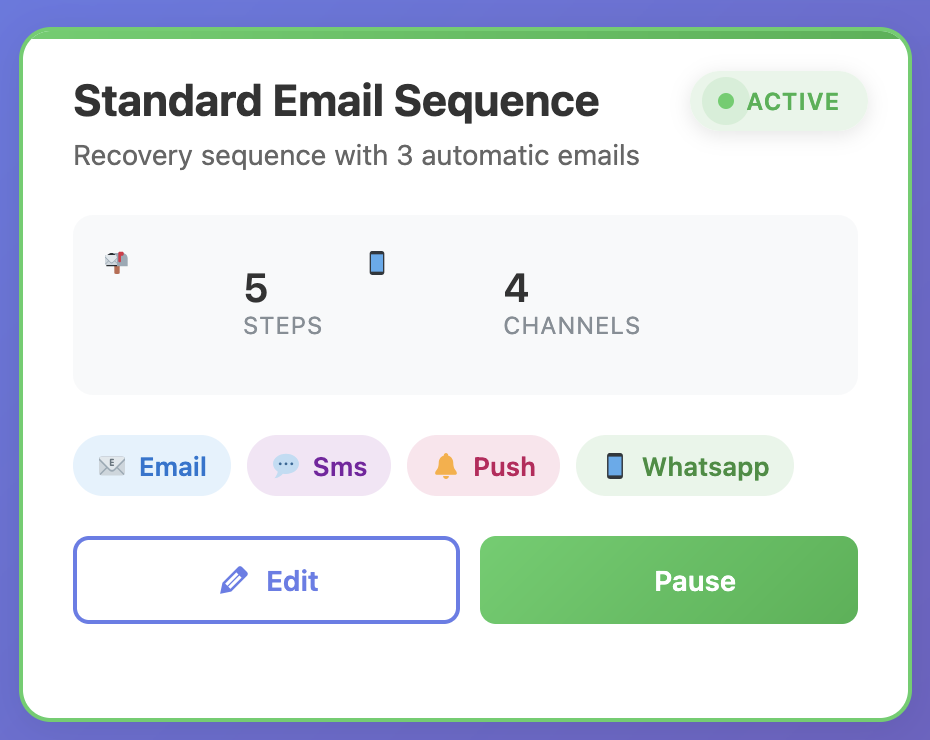
Create powerful automation workflows that recover carts across multiple channels
Why Exit-Intent Technology Matters
The best time to recover a cart? Before it’s abandoned. Exit-intent technology detects when a customer is about to leave your site and triggers a popup or offer. This alone can recover 2-4% of carts before they’re even abandoned. But most WooCommerce stores don’t have this technology.
Advanced exit-intent popups can include gamification elements like spin-to-win wheels, which convert 47% better than regular discount popups. They create urgency without feeling pushy, and they automatically generate unique WooCommerce coupons for tracking redemption rates and ROI.
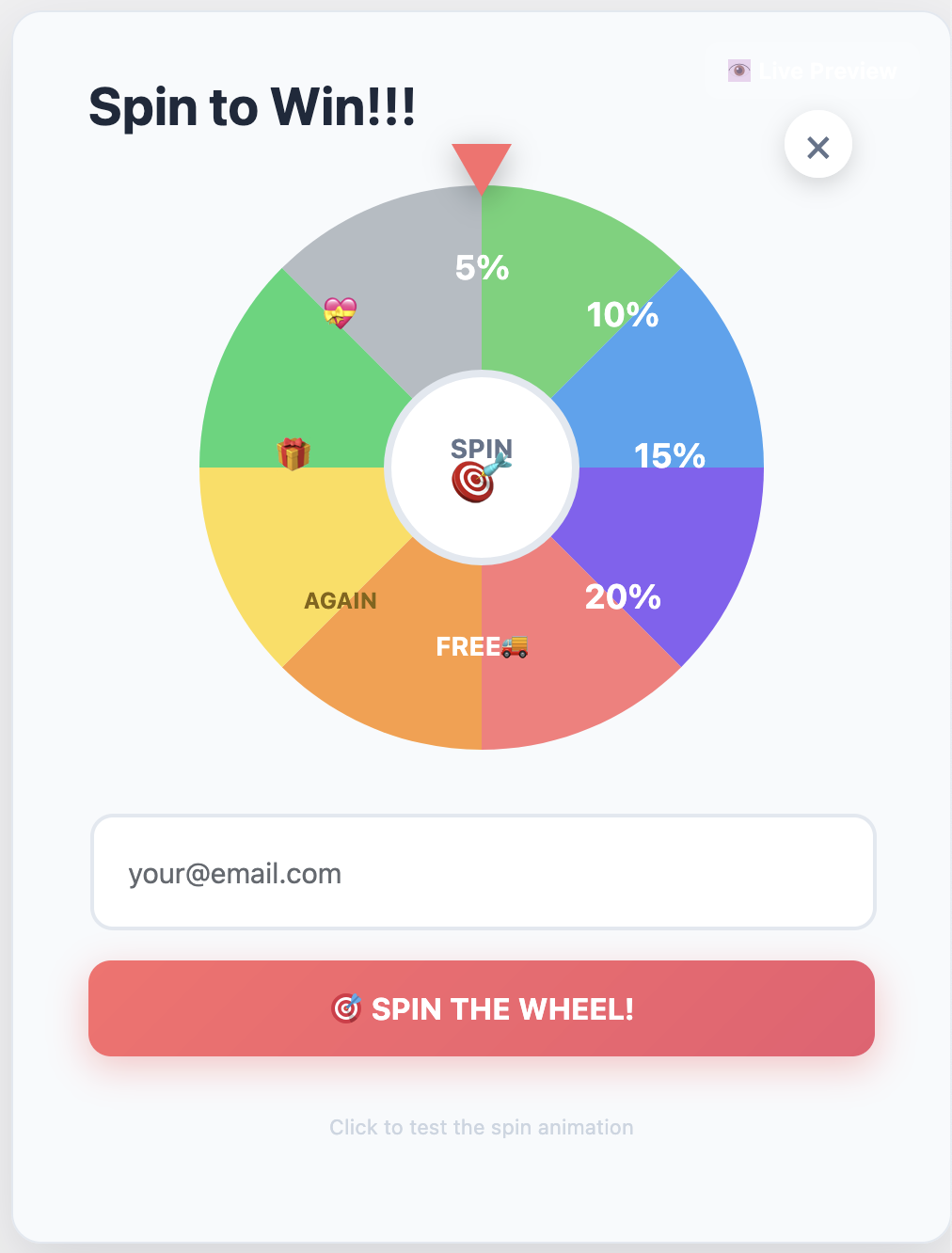
Gamify your capture experience with interactive spin-to-win rewards
The Customer Journey: Understanding What Drives Conversions
Here’s what most store owners miss: conversion isn’t just about the checkout process. It’s about understanding the entire customer journey—from landing page to purchase. The best cart recovery solutions track how customers arrived at your store (UTM parameters, referrers, campaigns), which products they viewed, and what convinced them to add items to their cart.
This data is gold for optimizing your marketing campaigns and understanding customer behavior. For example, if you know that customers from Facebook ads have a higher abandonment rate, you can create targeted recovery sequences specifically for them. If you know that customers who view product videos are more likely to convert, you can prioritize video content in your recovery emails.
Advanced segmentation features let you create segments based on cart value, customer type (new vs. returning), products, geography, device type, and more. Then you can trigger different recovery sequences for each segment. This level of personalization is what separates good recovery rates from great ones.
For a comprehensive guide on understanding and optimizing the customer journey, check out our detailed resource: The Complete Guide to WooCommerce Abandoned Cart Recovery. It covers everything from initial setup to advanced optimization strategies.
The Math That Matters: Understanding Cart Recovery ROI
Let’s talk numbers. Because if you’re not tracking ROI, you’re flying blind. Here’s how cart recovery ROI actually works:
Say you’re running a WooCommerce store doing $50,000/month in sales. With a 70% abandonment rate, you’re losing $35,000/month in potential revenue. If you recover 20% of that (which is achievable with the right solution), you’re recovering $7,000/month—$84,000 per year.
A premium cart recovery solution costs around €49/year. That’s a 1,714x ROI. Even if you only recover 10% of abandoned carts, you’re still looking at an 857x ROI. This isn’t marketing fluff; this is real math.
💡 Real-World Example: A client of mine switched from basic email recovery to a multi-channel solution. Their recovery rate went from 11.4% to 21.7%. On their $30K/month store, that meant an additional $3,090/month in recovered revenue. The solution paid for itself in the first hour.
But here’s what most store owners miss: the difference between a 13% recovery rate and a 21% recovery rate is massive. On that $50K/month store, that’s the difference between recovering $4,550/month and $7,350/month. That’s $33,600 per year in additional revenue.
How to Fix Your Conversion Problems (Step-by-Step)
Ready to fix your conversion problems? Here’s a proven strategy that works:
Step 1: Capture Email Addresses Early
Don’t wait until checkout to capture email addresses. Use exit-intent popups, timed popups, or scroll-triggered forms to capture emails before customers abandon. Offer a small discount (5-10%) to incentivize sign-ups. This alone can reduce abandonment by 2-4%.
Step 2: Set Up Multi-Channel Recovery Sequences
Don’t rely on email alone. Use email for the first reminder, SMS for urgency, and push notifications for re-engagement. Different customers respond to different channels. Research shows that SMS recovery rates are 3x higher than email, and WhatsApp has a 98% open rate.
Step 3: Time Your Messages Strategically
Send the first email within 1 hour of abandonment (when intent is highest), the second after 24 hours, and the third after 72 hours. After that, you’re probably annoying them. Use automation to handle this automatically—you shouldn’t have to manually send recovery emails.
Step 4: Personalize Your Messages
Use dynamic content to show the exact products they abandoned, include product images, and reference their cart value. Generic emails don’t convert. Personalization increases conversion rates by up to 26%.
Step 5: Create Urgency
Use countdown timers, limited-time discounts, and stock alerts. But don’t fake it—customers can tell when urgency is manufactured. Real urgency (like limited stock or expiring discounts) works best.
Step 6: Segment Your Campaigns
High-value carts deserve different treatment than low-value carts. New customers need different messaging than returning customers. Use segmentation to send the right message to the right customer at the right time.
Step 7: Test and Optimize
A/B test subject lines, email copy, discount amounts, and send times. What works for one store might not work for another. Track your metrics weekly at first, then monthly once you’ve optimized.
For more detailed strategies, check out our guides on how to reduce cart abandonment and cart recovery automation strategies that actually work.
💡 Pro Tip: Start with exit-intent popups and basic email sequences. Once you see results, expand to multi-channel recovery. Most stores see a 15-20% recovery rate within the first month of implementation.
Common Conversion Mistakes to Avoid
I’ve seen store owners make the same mistakes over and over. Here’s what to avoid:
- Sending too many emails: More isn’t better. Three emails max, spaced appropriately. After that, you’re spamming.
- Using generic templates: “You left something in your cart” doesn’t work. Personalize with product names, images, and cart value.
- Ignoring mobile: 60%+ of cart abandonment happens on mobile. Make sure your emails and popups are mobile-optimized.
- Not testing: Set it and forget it doesn’t work. Test different subject lines, send times, and discount amounts.
- Forgetting about GDPR: Get proper consent before collecting emails. Use built-in consent management features.
- Not tracking ROI: If you can’t measure it, you can’t improve it. Use analytics to track recovery rates and revenue.
For more advanced strategies, check out our comprehensive guides on setting up and optimizing abandoned cart recovery and how to set up a complete recovery system.
The Performance Factor: Why Speed Matters
Here’s something most store owners don’t realize: your cart recovery solution shouldn’t slow down your site. A slow plugin can actually increase abandonment by slowing your site down. Core Web Vitals matter for SEO, and a slow site hurts your rankings.
The best cart recovery solutions have virtually zero impact on performance. They’re built with performance-first architecture, using lightweight code and efficient database queries. Always test performance before and after installation, especially if you’re already struggling with site speed.
For more information on performance optimization, check out our guide on increasing WooCommerce sales with cart recovery and turning abandoned carts into sales.
Stop Losing Revenue to Abandoned Carts
Get the highest-performing cart recovery solution for WooCommerce. Recover abandoned carts across multiple channels and turn lost revenue into sales.
The Bottom Line: Why Your Store Isn’t Converting
Here’s the truth: your WooCommerce store isn’t converting because you’re not recovering abandoned carts. You’re letting 70% of your potential revenue walk away. But here’s what’s worse: even if you are attempting cart recovery, you’re probably doing it wrong.
Most stores send generic emails days after abandonment, when the customer has already moved on. They don’t use exit-intent technology to catch customers before they leave. They don’t use multi-channel recovery to reach customers where they are. And they don’t personalize their messages or segment their campaigns.
The solution? Use a comprehensive cart recovery solution that does all of this automatically. One that tracks the customer journey, captures emails early, sends multi-channel recovery sequences, and personalizes every message. One that has virtually zero impact on performance and provides detailed analytics so you can optimize your campaigns.
The difference between a 2% conversion rate and a 4% conversion rate isn’t just double—it’s transformative. And cart recovery is the fastest way to get there.
For more insights on maximizing revenue, check out our guide on maximizing revenue with abandoned cart recovery.
Cart Recovery Pro – The Complete WooCommerce Abandoned Cart Recovery Solution
🚀 Product Name: Cart Recovery Pro
Product URL:https://www.xpertplugins.com/negozio/wp-abandoned-cart-recovery/
Price:49,00 € per year (Free version available)
Description: Cart Recovery Pro is a native WordPress plugin for WooCommerce that combines live cart tracking, journey analytics, gamified capture (spin-to-win), and omnichannel messaging (email, SMS, WhatsApp, push notifications) to recover abandoned carts and grow revenue. Everything runs inside WordPress—no external services required.
Key Features:
- Multi-Channel Recovery: Email, SMS, WhatsApp, and web push notifications—all in one plugin
- Advanced Automation: Create complex workflows based on cart value, products, customer history, and behavioral triggers
- Exit-Intent Technology: Built-in exit-intent detection with spin-to-win gamification (47% better conversion than regular popups)
- Customer Journey Tracking: Track UTM parameters, referrers, campaigns, and product views to understand what drives conversions
- Powerful Analytics: See exactly how much revenue you’re recovering, from which channels, and which campaigns perform best
- Lightning Fast: Zero impact on site performance (tested on sites with 50K+ products)
- GDPR Compliant: Built-in consent management, data retention controls, and privacy-first design
- 21.7% Recovery Rate: Highest tested recovery rate among all WooCommerce cart recovery plugins
✓ Native WordPress plugin · ✓ No external services required · ✓ 30-day money-back guarantee
Frequently Asked Questions
Why is my WooCommerce conversion rate so low?
Most WooCommerce stores have low conversion rates because they’re not recovering abandoned carts. With a 70% cart abandonment rate, you’re losing most of your potential revenue. The solution is to implement a comprehensive cart recovery system that captures emails early, sends multi-channel recovery sequences, and personalizes every message.
How much revenue can I recover from abandoned carts?
It depends on your store size and recovery rate. A store doing $10,000/month in sales loses approximately $7,000/month to abandonment. Recovering 20% of that (which is achievable with the right solution) means recovering $1,400/month—$16,800 per year. Even recovering 10% adds $8,400 per year in recovered revenue.
Do I need a paid cart recovery solution?
Free solutions are great for testing, but paid solutions offer advanced features like multi-channel recovery (SMS, WhatsApp, push notifications), exit-intent popups, advanced segmentation, A/B testing, and detailed analytics. The ROI is typically 800-1,700x, so the investment pays for itself quickly.
Will cart recovery slow down my site?
It depends on the solution. Premium cart recovery solutions have virtually zero impact on performance. They’re built with performance-first architecture, using lightweight code and efficient database queries. Always test performance before and after installation, especially if you’re already struggling with site speed.
How long does it take to set up cart recovery?
With a premium solution, setup takes about 25-30 minutes. Most of that is customizing email copy to match your brand voice. The automation settings are intuitive, and you can be up and running quickly. Most stores see results within the first week.
What’s the difference between email-only and multi-channel recovery?
Email-only recovery relies solely on email reminders. Multi-channel recovery uses email, SMS, WhatsApp, and push notifications to reach customers where they are. Research shows that SMS recovery rates are 3x higher than email, and WhatsApp has a 98% open rate. Multi-channel recovery typically achieves 20%+ recovery rates, compared to 10-15% for email-only.
Is cart recovery GDPR compliant?
Reputable cart recovery solutions include GDPR compliance features like consent management, data retention controls, and the ability to handle data deletion requests. However, compliance also depends on your implementation: you need to get proper consent before collecting email addresses, provide clear privacy policies, and honor opt-out requests.
Start Recovering Your Lost Revenue Today
Get Cart Recovery Pro and start turning abandoned carts into sales. Multi-channel recovery, exit-intent popups, and advanced automation—all in one powerful WordPress plugin.