
Transform abandoned carts into recovered revenue with proven strategies, advanced automation, and the right tools for your WooCommerce store.
The Hidden Revenue Opportunity in Every Abandoned Cart
Studies show that 70% of online shopping carts are abandoned before checkout. For a WooCommerce store generating $10,000 monthly, that’s $7,000 in potential revenue walking away. But here’s the game-changer: with the right recovery strategy, you can reclaim 30-40% of those abandoned carts. This comprehensive guide reveals everything you need to build a complete abandoned cart recovery system that works.
Understanding Cart Abandonment: The Real Numbers Behind the Problem
Cart abandonment isn’t a new problem, but it’s one that’s getting worse. In 2025, the average abandonment rate across all e-commerce platforms hovers around 69.8%. For WooCommerce stores specifically, this number can be even higher depending on your industry, checkout process complexity, and customer acquisition channels. When dealing with abandoned cart for WooCommerce, understanding these statistics is crucial for developing effective recovery strategies.
The reasons customers abandon carts are multifaceted. Some are intentional—they’re comparison shopping, saving items for later, or researching before purchase. Others are unintentional—technical issues, unexpected shipping costs, or simply getting distracted. Understanding these motivations is the first step in building an effective recovery strategy. WooCommerce cart abandonment occurs for various reasons, and each abandoned shopping cart represents a potential sale waiting to be recovered.
What makes cart abandonment particularly frustrating for WooCommerce store owners is that these aren’t cold leads. These are customers who have already demonstrated purchase intent by adding items to their cart. They’ve invested time browsing your products, reading descriptions, and making selections. This makes them significantly more likely to convert than a typical website visitor—if you can reach them at the right moment with the right message.
The good news? Cart abandonment recovery has evolved dramatically. Modern solutions go far beyond simple “you left something behind” emails. Today’s strategies include real-time cart tracking, multi-channel messaging, behavioral triggers, and sophisticated automation sequences that adapt to each customer’s journey. If you’re still relying on basic email reminders, you’re leaving significant revenue on the table. For a comprehensive overview of recovery strategies, see our complete guide to WooCommerce abandoned cart recovery.
Why Cart Recovery Matters: The Business Impact
Let’s talk numbers. If your WooCommerce store generates $50,000 in monthly revenue, you’re likely losing $35,000 to cart abandonment. Even recovering 25% of those abandoned carts would add $8,750 to your monthly revenue—that’s $105,000 annually. For many stores, this recovered revenue can be the difference between struggling and thriving. WooCommerce cart recovery transforms these lost opportunities into actual sales, making it one of the highest ROI investments for e-commerce stores.
Beyond the direct revenue impact, cart recovery provides valuable insights into your store’s performance. By analyzing which products are most frequently abandoned, which traffic sources have the highest abandonment rates, and where customers drop off in the checkout process, you can identify and fix systemic issues that are costing you sales.
Cart recovery also improves your customer acquisition economics. When you recover an abandoned cart, you’re converting a customer you’ve already paid to acquire. This means your cost per acquisition (CPA) decreases, and your return on ad spend (ROAS) increases. For stores running paid advertising campaigns, this can make the difference between profitable and unprofitable campaigns.
Perhaps most importantly, cart recovery helps you understand your customers better. The data you collect from abandoned carts reveals shopping patterns, price sensitivity, product preferences, and friction points in your buying process. This intelligence informs everything from product development to marketing strategy to site optimization. As explored in our guide on why your WooCommerce store isn’t converting, understanding these patterns is crucial for long-term growth.
The Complete Recovery Strategy Framework for Abandoned Cart for WooCommerce
Building an effective cart recovery system requires a multi-layered approach. You can’t rely on a single tactic—success comes from combining multiple strategies that work together to maximize recovery rates. Here’s the complete framework that top-performing WooCommerce stores use. When implementing an abandoned cart for WooCommerce solution, this comprehensive approach ensures you’re covering all angles of recovery.
Layer 1: Real-Time Cart Tracking and Monitoring for WooCommerce
Before you can recover abandoned carts, you need to know they exist. Real-time cart tracking captures every interaction a customer has with your store, from the moment they land on your site to when they add items to their cart. This includes tracking which products they viewed, how long they spent on each page, what traffic source brought them in, and exactly when they abandoned. For any abandoned cart for WooCommerce strategy, this foundational tracking is essential to identify recovery opportunities. WooCommerce abandoned cart tracking provides the visibility needed to understand customer behavior patterns.
Modern cart recovery solutions provide live dashboards where you can see carts being created and abandoned in real-time. This visibility is crucial for identifying patterns and understanding customer behavior. You can see which products are most frequently abandoned, which traffic sources have the highest abandonment rates, and which customer segments are most likely to convert when recovered. When managing abandoned cart for WooCommerce stores, these insights help prioritize which carts deserve immediate attention.

Real-time abandoned cart dashboard showing recent cart activity, values, and recovery opportunities in your WooCommerce store.
The best tracking systems also capture the customer journey before cart abandonment. This includes UTM parameters, referrer information, campaign data, and a timeline of product views. This context is invaluable when crafting recovery messages—you can reference specific products they viewed or campaigns that brought them in, making your outreach more relevant and effective.
Layer 2: Pre-Abandonment Capture Strategies
The most effective recovery happens before abandonment occurs. Exit-intent popups, spin-to-win wheels, and timed offers can capture customer information and provide incentives to complete the purchase immediately. These strategies are particularly effective because they intercept customers at the moment they’re considering leaving.
Exit-intent technology detects when a customer’s mouse moves toward the browser’s back button or address bar, triggering a popup before they leave. This popup can offer a discount code, free shipping, or another incentive to complete the purchase. The key is making the offer compelling enough to overcome whatever hesitation caused them to consider leaving.
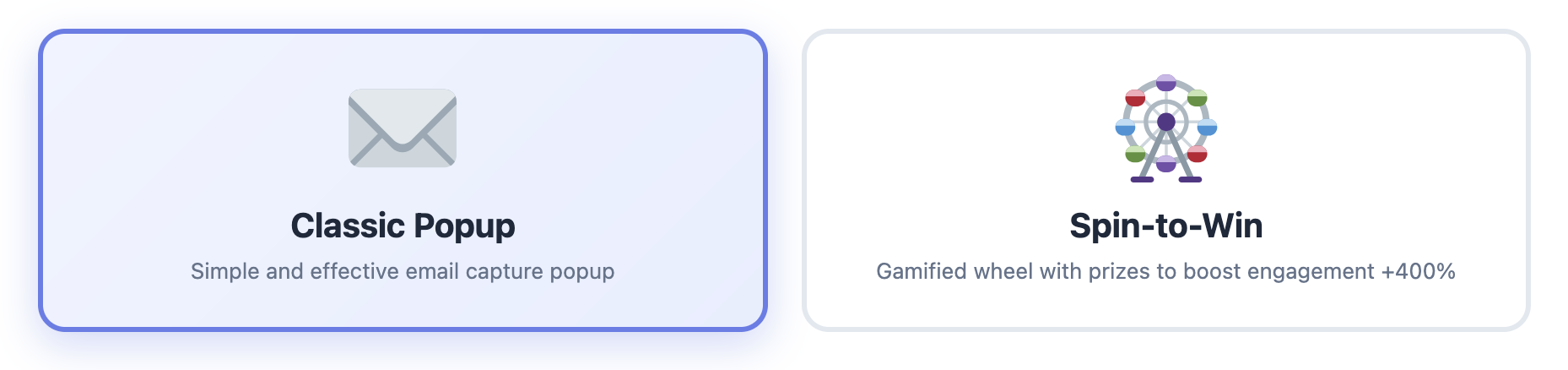
Gamified capture tools like spin-to-win wheels and exit-intent popups can dramatically increase conversion rates by offering incentives at the moment of abandonment.
Spin-to-win wheels add a gamification element that makes the capture experience more engaging. Customers spin a wheel to win a discount, and in the process, they provide their email address or phone number. This approach has been shown to increase capture rates by 30-40% compared to standard popups, and the excitement of the game can overcome purchase hesitations. For WooCommerce abandoned cart recovery, these interactive elements significantly improve contact capture rates before carts are abandoned.
Layer 3: Multi-Channel Recovery Sequences
Once a cart is abandoned, you need a multi-touchpoint recovery strategy. The most effective approach uses multiple channels—email, SMS, WhatsApp, and push notifications—in a coordinated sequence that increases in urgency over time. Each channel has different strengths, and using them together maximizes your chances of reaching and converting the customer.
Email remains the foundation of cart recovery, but it shouldn’t be your only channel. SMS messages have open rates of 98% and are read within minutes, making them perfect for time-sensitive offers. WhatsApp provides a more personal touch and is particularly effective in certain markets. Push notifications can re-engage customers who have your site open in another tab.
The timing of your recovery messages is critical. Research shows that the first recovery attempt should happen within 30 minutes of abandonment, when the purchase intent is still fresh. Subsequent messages should be spaced strategically—typically at 1 hour, 24 hours, 3 days, and 7 days. Each message should offer increasing value or urgency to motivate action.
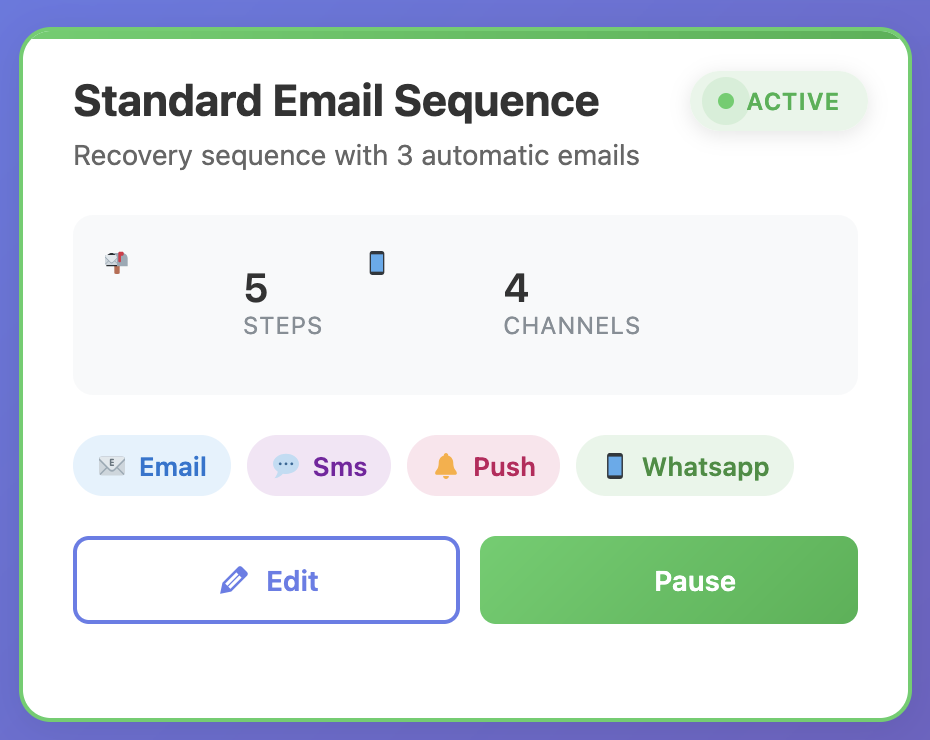
Advanced automation workflows allow you to create sophisticated multi-channel recovery sequences with conditional logic and personalized messaging.
Your recovery sequences should also be dynamic, adapting to customer behavior. If a customer clicks through from an email but doesn’t complete the purchase, pause the email sequence and try SMS. If they add different items to their cart, update your messaging to reflect the new products. If they’ve already purchased, remove them from the recovery sequence immediately. This level of sophistication requires automation tools that can track customer behavior across channels. For actionable tips on optimizing your recovery sequences, check out our top 10 tips to recover abandoned carts.
Ready to Recover Your Abandoned Carts?
Cart Recovery Pro is a native WordPress plugin that combines real-time cart tracking, multi-channel messaging, and advanced automation—all running inside your WordPress dashboard. No external services required. Everything you need to recover abandoned carts and grow revenue.
Get Cart Recovery Pro – €49Advanced Recovery Techniques for Maximum Conversion
Once you have the basics in place, you can implement advanced techniques that separate top-performing stores from average ones. These strategies require more sophisticated tools and deeper analysis, but they deliver significantly higher recovery rates. Advanced WooCommerce cart abandonment recovery techniques leverage behavioral data, machine learning, and predictive analytics to maximize conversion rates from abandoned shopping carts.
Segmentation and Personalization
Not all abandoned carts are created equal. A customer who abandoned a $500 cart deserves different treatment than someone who abandoned a $20 cart. Similarly, a first-time visitor needs different messaging than a returning customer. Segmentation allows you to prioritize high-value carts and tailor your recovery approach to each customer segment.
Effective segmentation considers cart value, customer lifetime value, purchase history, traffic source, device type, and geographic location. High-value carts might receive immediate SMS outreach and personalized phone calls, while lower-value carts might go through a standard email sequence. VIP customers might get exclusive offers, while first-time visitors might get educational content about your products.
Personalization goes beyond just using the customer’s name. Include the specific products they abandoned, reference their browsing history, mention the campaign that brought them in, and adjust your offer based on their cart value. A customer who abandoned a $200 cart might get a 15% discount, while someone who abandoned a $50 cart might get free shipping. This level of personalization requires tools that can dynamically generate content based on cart data.
Dynamic Coupon Generation
Static discount codes are easy to share and abuse. Dynamic coupon generation creates unique, single-use codes for each abandoned cart, preventing code sharing and allowing you to track which recovery messages are most effective. These codes can also have expiration dates, creating urgency, and usage limits, ensuring they’re only used once.
The best systems automatically generate coupons when a cart is abandoned and include them in recovery messages. The discount amount can be dynamic based on cart value—higher-value carts might get larger discounts, while lower-value carts might get smaller ones or free shipping. This ensures you’re not over-discounting while still providing enough incentive to complete the purchase.
Behavioral Triggers and Conditional Logic
Advanced recovery systems use behavioral triggers to adapt messaging in real-time. If a customer clicks through from a recovery email but doesn’t purchase, trigger an SMS with a time-limited offer. If they add different products to their cart, update your messaging to reflect those products. If they visit your site from a different device, recognize them and show a personalized message.
Conditional logic allows you to create sophisticated workflows that respond to customer behavior. For example, you might send different messages based on cart value, time since abandonment, number of previous recovery attempts, or customer segment. This ensures every customer receives the most relevant message at the most effective time.
These advanced techniques require sophisticated automation tools, but they’re what separate stores recovering 40% of abandoned carts from those recovering 10%. As detailed in our comprehensive guide on turning abandoned carts into sales with automation, the right tools make all the difference.
Choosing the Right Cart Recovery Solution
Not all cart recovery solutions are created equal. Some are basic email-only tools, while others are comprehensive platforms with advanced features. Choosing the right solution depends on your store’s size, technical requirements, and recovery goals. When selecting an abandoned cart for WooCommerce plugin, consider factors like native integration, multi-channel capabilities, and automation features. Here’s what to look for when evaluating options.
Native WordPress Integration
Many cart recovery solutions are SaaS platforms that require you to send customer data to external servers. This creates privacy concerns, GDPR compliance issues, and dependency on third-party services. A native WordPress plugin runs entirely within your WordPress installation, keeping all data on your server and giving you complete control.
Native plugins also integrate seamlessly with WooCommerce, pulling product data, customer information, and order history directly from your database. This eliminates the need for API integrations, webhooks, or data synchronization, reducing complexity and potential points of failure.
Multi-Channel Capabilities
Email alone isn’t enough. Look for solutions that support SMS, WhatsApp, push notifications, and other channels. The best tools allow you to orchestrate multi-channel campaigns from a single dashboard, with conditional logic that determines which channel to use based on customer behavior and preferences.
Real-Time Tracking and Analytics
You need visibility into what’s happening with your abandoned carts. Look for dashboards that show real-time cart activity, recovery rates by segment, revenue recovered, and campaign performance. Advanced analytics help you identify trends, optimize your recovery strategy, and measure ROI.
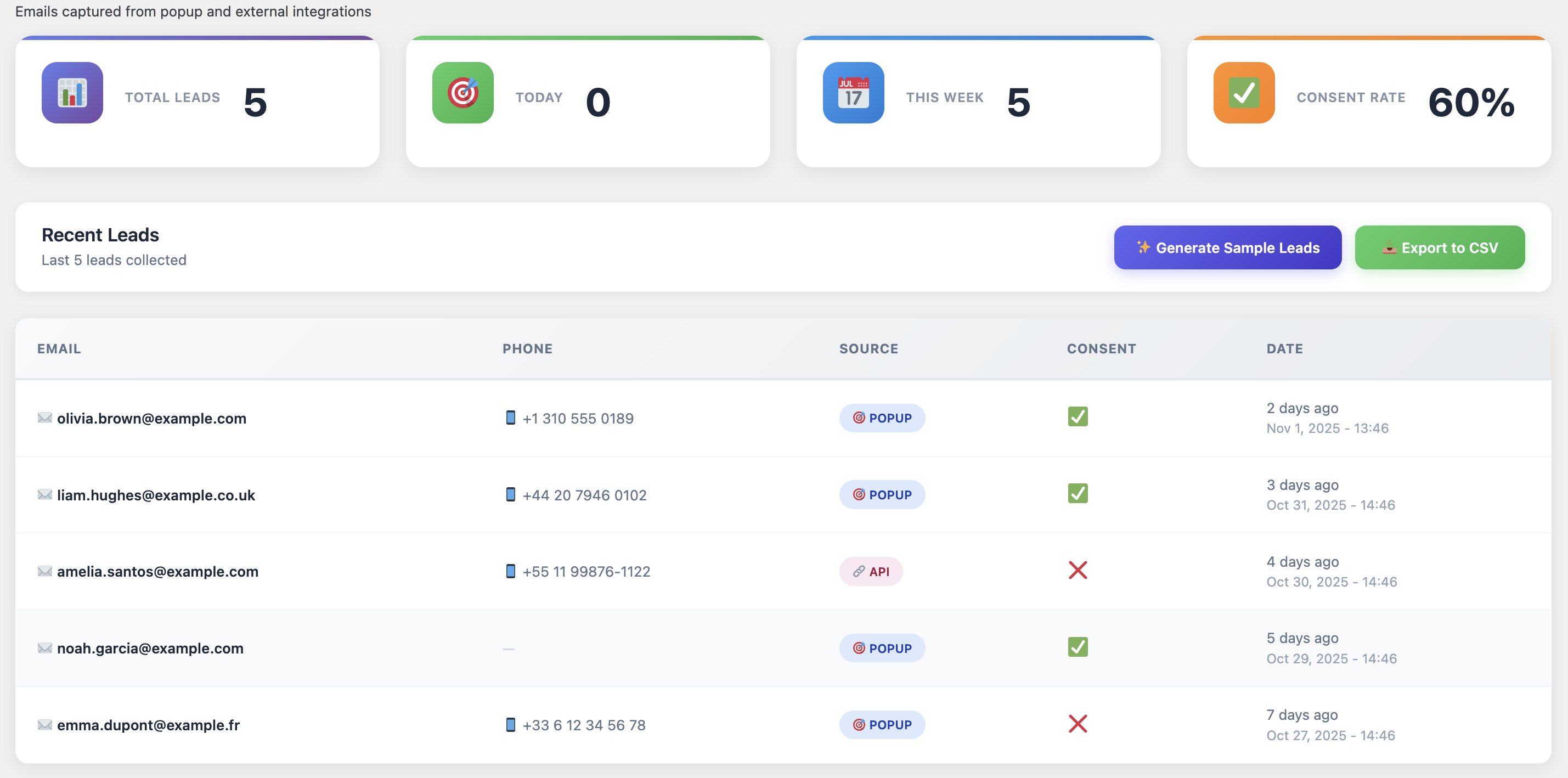
Comprehensive analytics dashboards provide insights into cart abandonment patterns, recovery performance, and customer behavior to help you optimize your strategy.
Advanced Automation Features
Look for drag-and-drop automation builders that allow you to create sophisticated workflows without coding. The best tools support conditional logic, A/B testing, dynamic content, and integration with other marketing tools. You should be able to create complex sequences that adapt to customer behavior automatically.
Other important features include dynamic coupon generation, exit-intent popups, spin-to-win gamification, customer journey tracking, UTM attribution, and segmentation capabilities. For a detailed comparison of available options, check out our review of the best WooCommerce abandoned cart plugins.
Implementation Guide: Setting Up Your Recovery System
Setting up an effective cart recovery system doesn’t have to be complicated. With the right tools and approach, you can have a basic system running in under an hour, and a sophisticated multi-channel setup within a day. Here’s a step-by-step implementation guide for abandoned cart for WooCommerce recovery. Whether you’re new to cart recovery or looking to optimize existing systems, this guide covers everything you need.
Step 1: Install and Configure Your Recovery Plugin
Start by installing your chosen cart recovery plugin. If you’re using a native WordPress solution like Cart Recovery Pro, installation is straightforward—upload the plugin, activate it, and sync it with your WooCommerce data. The plugin should automatically detect your products, customer data, and order history. This native integration is crucial for abandoned cart for WooCommerce solutions, as it ensures seamless data flow between your store and recovery system. For detailed step-by-step instructions, follow our ultimate setup and optimization guide.
Configure basic settings like cart abandonment time (typically 30 minutes to 1 hour), which products to track, and data retention policies. Enable real-time cart tracking so you can see abandoned carts as they happen. This gives you immediate visibility into the problem. WooCommerce abandoned cart tracking provides instant alerts when shoppers leave without completing their purchase, allowing for timely intervention.
Step 2: Set Up Capture Tools
Before customers abandon, capture their contact information. Set up exit-intent popups that trigger when customers are about to leave. Configure spin-to-win wheels or other gamified capture tools. These should offer enough value to motivate customers to provide their email or phone number.
Make sure your capture tools are mobile-responsive and don’t interfere with the shopping experience. Test them on different devices and browsers to ensure they work correctly. The goal is to capture information without being intrusive or annoying.
Step 3: Create Your Recovery Email Sequence
Start with a basic email sequence. Your first email should go out within 30 minutes of abandonment and include the abandoned products, a clear call-to-action, and a discount offer. Subsequent emails should increase in urgency and value—perhaps offering a larger discount or highlighting limited stock.
Personalize your emails with the customer’s name, abandoned products, and cart value. Use dynamic content that updates based on the specific cart. Include product images, descriptions, and direct links to the checkout page. Make it as easy as possible for customers to complete their purchase. Effective abandoned cart for WooCommerce email campaigns leverage personalization to increase engagement rates significantly. For inspiration, see our collection of best email templates for cart recovery, which includes proven templates that convert.
Step 4: Add Multi-Channel Recovery
Once your email sequence is working, add SMS and other channels. SMS is particularly effective for time-sensitive offers and has much higher open rates than email. Set up WhatsApp integration if it’s popular in your target markets. Configure push notifications for customers who have your site open.
Create conditional logic that determines which channel to use based on customer behavior. For example, if a customer doesn’t open your recovery email, try SMS. If they click through but don’t purchase, send a push notification with a time-limited offer. This multi-channel approach significantly increases recovery rates.
Step 5: Implement Advanced Features
As you become more comfortable with the system, add advanced features. Set up dynamic coupon generation so each abandoned cart gets a unique discount code. Create customer segments based on cart value, purchase history, or behavior. Implement A/B testing to optimize your messaging and offers.
Use analytics to identify trends and optimize your strategy. Which products are abandoned most frequently? Which traffic sources have the highest abandonment rates? Which recovery messages are most effective? Use this data to continuously improve your recovery system. For a detailed setup walkthrough, see our guide on setting up an abandoned cart recovery system, or explore our complete guide to WooCommerce abandoned cart recovery for comprehensive strategies.
Start Recovering Abandoned Carts Today
Join thousands of WooCommerce stores using Cart Recovery Pro to recover lost revenue. Real-time tracking, multi-channel messaging, and advanced automation—all in one native WordPress plugin. No external services. Complete control. Maximum recovery.
Get Started Now – €49Measuring Success: Key Metrics to Track
You can’t improve what you don’t measure. Tracking the right metrics helps you understand how well your recovery system is performing and where you can optimize. Here are the key metrics every WooCommerce store owner should monitor. When implementing abandoned cart for WooCommerce recovery, these metrics provide actionable insights that drive continuous improvement and revenue growth.
Cart Abandonment Rate
Your cart abandonment rate is the percentage of carts that are created but never completed. This is your baseline metric. The industry average is around 70%, but your goal should be to get below 60%. Track this metric over time to see if your prevention strategies (like exit-intent popups) are working.
Recovery Rate
Your recovery rate is the percentage of abandoned carts that eventually convert. A good recovery rate is 25-40%, meaning you’re converting a quarter to two-fifths of abandoned carts. This is your primary success metric for your recovery system.
Revenue Recovered
This is the total revenue generated from recovered carts. Track this monthly to understand the financial impact of your recovery system. If you’re recovering $5,000 per month, that’s $60,000 annually—significant revenue that would otherwise be lost.
Email Open and Click Rates
Monitor how many customers open your recovery emails and click through to your store. Low open rates might indicate poor subject lines or timing issues. Low click rates might indicate that your offers aren’t compelling enough or your messaging isn’t relevant.
Channel Performance
If you’re using multiple channels, track which ones are most effective. You might find that SMS has higher conversion rates than email, or that push notifications work better for certain customer segments. Use this data to allocate your efforts and budget.
Time to Recovery
Track how long it takes from cart abandonment to recovery. Most recoveries happen within 24 hours, but some take longer. Understanding this timeline helps you optimize your message timing and identify opportunities for faster recovery.
Regularly review these metrics and use them to optimize your recovery strategy. Test different messaging, timing, offers, and channels to see what works best for your store. The goal is continuous improvement. For more optimization strategies, see our guide on top 10 tips to recover abandoned carts, which includes battle-tested tactics that can significantly improve your recovery rates.
Common Pitfalls and How to Avoid Them
Many WooCommerce stores implement cart recovery systems but don’t achieve the results they expect. Often, this is due to common mistakes that are easily avoidable. Here are the most frequent pitfalls and how to prevent them. Understanding these common errors is essential for anyone managing abandoned cart for WooCommerce recovery, as they can significantly impact your recovery rates and revenue.
Pitfall 1: Waiting Too Long to Send Recovery Messages
The longer you wait to reach out, the less likely you are to recover the cart. Purchase intent fades quickly—what seems urgent at the moment of abandonment becomes less important hours or days later. Send your first recovery message within 30 minutes, not 24 hours.
Pitfall 2: Generic, Non-Personalized Messages
Generic “you left something behind” emails don’t work. Customers receive dozens of these every week and ignore them. Personalize your messages with the specific products they abandoned, their name, and relevant context. Show them you understand what they were looking for.
Pitfall 3: Over-Discounting
While discounts can motivate purchases, offering too much discount trains customers to wait for better deals. Use dynamic discounts based on cart value, and don’t offer your best discount in the first message. Start smaller and increase if needed.
Pitfall 4: Ignoring Mobile Customers
More than half of e-commerce traffic is mobile, and mobile customers have different needs. Make sure your recovery emails are mobile-responsive, your checkout process works on mobile devices, and you’re using SMS for mobile-heavy segments.
Pitfall 5: Not Testing and Optimizing
Many stores set up a recovery system and never optimize it. Test different subject lines, messaging, offers, timing, and channels. Use A/B testing to identify what works best for your audience. Continuous optimization is key to maximizing recovery rates.
Pitfall 6: Relying on Email Alone
Email is important, but it’s not enough. Customers receive hundreds of emails daily, and yours might get lost. Use multiple channels—SMS, WhatsApp, push notifications—to increase your chances of reaching customers. Multi-channel recovery significantly outperforms email-only strategies.
The Future of Cart Recovery: Trends and Innovations
Cart recovery technology is evolving rapidly. New innovations are making recovery more effective, more automated, and more personalized. The future of abandoned cart for WooCommerce recovery looks promising, with AI-powered personalization, predictive analytics, and cross-device tracking becoming standard features. Here are the trends shaping the future of cart recovery.
AI-Powered Personalization
Artificial intelligence is enabling hyper-personalized recovery messages that adapt to each customer’s behavior, preferences, and purchase history. AI can determine the optimal message timing, channel, offer, and content for each individual customer, dramatically improving recovery rates.
Predictive Analytics
Advanced analytics can predict which carts are most likely to be abandoned and which customers are most likely to convert when recovered. This allows stores to prioritize high-value, high-probability recoveries and allocate resources more effectively.
Cross-Device Tracking
Customers often browse on one device and purchase on another. Cross-device tracking allows recovery systems to recognize customers across devices and continue the recovery process seamlessly, regardless of which device they’re using.
Voice and Chat Integration
As voice assistants and chat interfaces become more common, recovery systems are integrating with these channels. Customers might receive recovery messages through Alexa, Google Assistant, or chat widgets, making recovery more convenient and accessible.
Real-Time Behavioral Triggers
The future of recovery is real-time. Systems can now detect when a customer is about to abandon and trigger immediate interventions—popups, offers, or support—before the cart is actually abandoned. This proactive approach prevents abandonment rather than just recovering it.
Frequently Asked Questions
What is the average cart abandonment rate for WooCommerce stores?
The average cart abandonment rate for WooCommerce stores is around 70%, similar to the overall e-commerce average. However, rates can vary significantly based on industry, checkout process complexity, and customer acquisition channels. Stores with optimized checkout processes and effective recovery systems typically see lower abandonment rates.
How quickly should I send the first recovery message?
The first recovery message should be sent within 30 minutes of cart abandonment. Purchase intent is highest immediately after abandonment, and waiting longer significantly reduces your chances of recovery. Some stores send messages even faster—within 15 minutes—for maximum effectiveness.
What’s a good recovery rate to aim for?
A good recovery rate is 25-40%, meaning you’re converting a quarter to two-fifths of abandoned carts. Top-performing stores with sophisticated multi-channel recovery systems can achieve rates of 40% or higher. If your recovery rate is below 20%, there’s significant room for improvement.
Do I need to offer discounts to recover carts?
Discounts can be effective, but they’re not always necessary. Some customers abandon due to technical issues, distractions, or other non-price reasons. Try recovery messages without discounts first, and only add discounts if your recovery rate is low. When you do use discounts, make them dynamic based on cart value.
Should I use email, SMS, or both?
Use both. Email is cost-effective and allows for rich content, while SMS has higher open rates and is more immediate. The best strategy is to start with email and add SMS for customers who don’t respond. Multi-channel recovery significantly outperforms single-channel approaches.
How many recovery messages should I send?
Most stores send 3-5 recovery messages over 7-10 days. The sequence typically includes: immediate reminder (30 minutes), follow-up (24 hours), final offer (3 days), and last chance (7 days). However, stop sending messages if the customer completes the purchase or unsubscribes.
Can I recover carts without a plugin?
Technically yes, but it’s extremely difficult and time-consuming. You’d need to manually track abandoned carts, collect customer information, send recovery emails, manage sequences, and track results. A dedicated plugin automates all of this and provides features like real-time tracking, multi-channel messaging, and advanced analytics that would be impossible to replicate manually.
Transform Abandoned Carts Into Revenue
Cart Recovery Pro gives you everything you need to build a complete abandoned cart recovery system. Real-time tracking, multi-channel messaging, advanced automation, and comprehensive analytics—all running natively in WordPress. Start recovering lost revenue today.
Get Cart Recovery Pro – €4930-day money-back guarantee • No credit card required for free version • Priority support included
Conclusion: Building Your Recovery System
Abandoned cart recovery isn’t optional—it’s essential for any serious WooCommerce store. With 70% of carts being abandoned, you’re leaving significant revenue on the table if you don’t have a recovery system in place. Implementing a comprehensive abandoned cart for WooCommerce solution transforms this lost revenue into recovered sales. But more importantly, cart recovery provides insights into your store’s performance, helps you understand your customers better, and improves your overall conversion optimization.
The strategies outlined in this guide—real-time tracking, multi-channel messaging, advanced automation, and continuous optimization—are what separate top-performing stores from average ones. Implementing these strategies requires the right tools, but the investment pays for itself quickly through recovered revenue.
Start with the basics: install a recovery plugin, set up email sequences, and begin tracking your abandonment rate. Then gradually add more sophisticated features: multi-channel messaging, dynamic coupons, segmentation, and advanced automation. Measure everything, test continuously, and optimize based on data.
Remember, cart recovery is an ongoing process, not a one-time setup. Customer behavior changes, new channels emerge, and best practices evolve. Stay current with trends, test new strategies, and continuously improve your recovery system. The stores that do this consistently achieve recovery rates of 40% or higher, turning abandoned carts into a significant revenue stream.
If you’re ready to build a complete recovery system, start with a solution that gives you all the tools you need in one place. Cart Recovery Pro is a native WordPress plugin that combines real-time tracking, multi-channel messaging, advanced automation, and comprehensive analytics—everything you need to recover abandoned carts and grow revenue, all running inside your WordPress dashboard. For more advanced strategies, see our complete guide on the ultimate setup and optimization guide, which covers everything from installation to advanced optimization techniques.