
In 2026, website speed isn’t just a nice-to-have—it’s a critical ranking factor that directly impacts your SEO performance, Core Web Vitals scores, and conversion rates. If you’re searching for a WordPress cache plugin that delivers measurable results without the complexity, you’ve come to the right place.
After extensive testing and real-world implementation across dozens of WordPress sites, WP Turbo Optimizer stands out as the premier solution for site owners who want professional-grade performance optimization without becoming technical experts. This comprehensive review will show you exactly why this plugin deserves a spot in your WordPress toolkit.
Why Website Speed Matters More Than Ever in 2026
Google’s algorithm updates have made page speed a non-negotiable ranking signal. Studies show that pages loading in under 2 seconds achieve the best conversion rates, while every additional second of load time can reduce conversions by up to 7%. More importantly, Core Web Vitals—Google’s user experience metrics—now directly influence search rankings.
These metrics include Largest Contentful Paint (LCP), First Input Delay (FID), and Cumulative Layout Shift (CLS). A cache plugin like WP Turbo Optimizer doesn’t just speed up your site—it optimizes these specific metrics that Google uses to rank your pages. This means faster sites don’t just provide better user experiences; they rank higher in search results.
For e-commerce sites, the impact is even more pronounced. Research from WooCommerce speed optimization studies demonstrates that checkout pages optimized with proper caching can reduce abandonment rates by over 60%. This isn’t just about SEO—it’s about revenue.
What Makes WP Turbo Optimizer Different
The WordPress plugin ecosystem is flooded with cache solutions, but most require extensive configuration, technical knowledge, or compromise between ease of use and performance. WP Turbo Optimizer breaks this mold by offering enterprise-level optimization with a setup process that takes less than 30 seconds.
Unlike traditional cache plugins that require you to understand browser caching, object caching, and database optimization separately, WP Turbo Optimizer provides an intelligent, unified system. The plugin automatically detects your site type—whether it’s an e-commerce store, blog, portfolio, or business site—and applies optimized settings accordingly.
Ready to Transform Your Site’s Performance?
Join thousands of WordPress site owners who’ve achieved green Core Web Vitals scores and faster load times with WP Turbo Optimizer.
Get WP Turbo Optimizer Now – €39Core Features That Drive Real Results
Intelligent HTML Page Caching
WP Turbo Optimizer’s caching engine goes beyond basic static file generation. It implements smart caching that automatically excludes dynamic pages like checkout, login, and account pages while aggressively caching everything else. This means your product pages and blog posts load instantly, while user-specific content remains dynamic and secure.
The plugin’s auto-clear functionality ensures that when you update content, the cache refreshes automatically. No manual purging required. This intelligent system prevents the common problem of serving stale content while maintaining optimal performance.
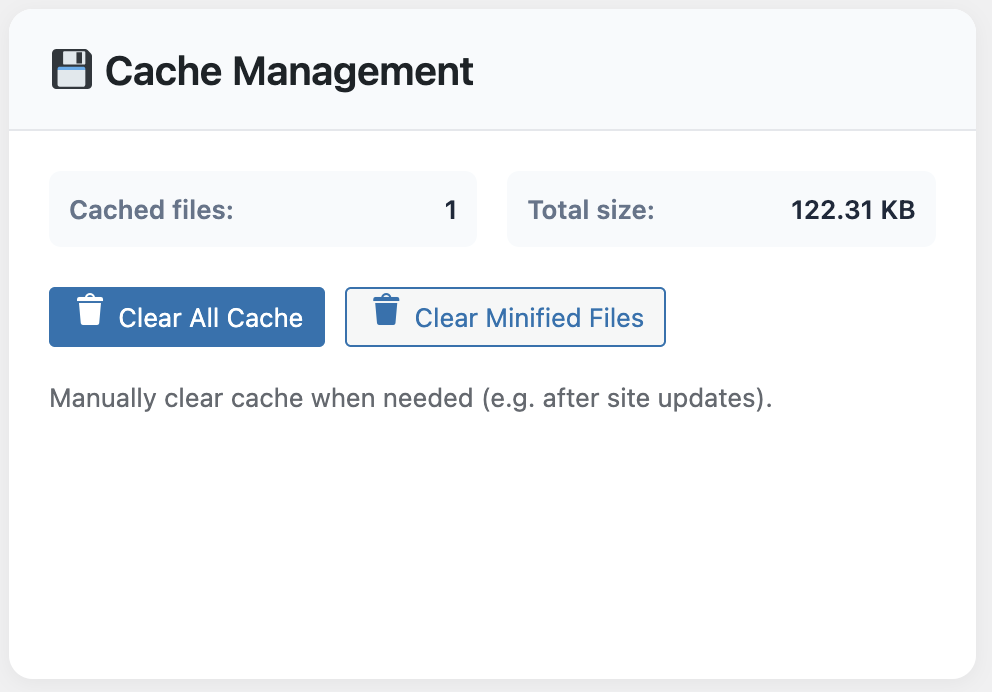
The intuitive cache management interface makes it easy to monitor and control your site’s caching behavior.
Advanced Code Optimization
Minification isn’t just about removing whitespace—it’s about reducing file sizes while maintaining functionality. WP Turbo Optimizer handles HTML, CSS, and JavaScript minification intelligently, ensuring compatibility with modern WordPress themes and plugins.
The plugin also removes query strings from static resources, which can improve caching behavior with CDNs and proxy servers. Combined with automatic GZIP compression, these optimizations can reduce file transfer sizes by 60-80%, dramatically improving load times for users on slower connections.
Image Optimization and Lazy Loading
Images often account for the largest portion of page weight. WP Turbo Optimizer implements native lazy loading for images, iframes, and videos, ensuring that off-screen content doesn’t slow down initial page loads. This directly improves Largest Contentful Paint (LCP) scores, one of Google’s key Core Web Vitals metrics.
The plugin also supports responsive image optimization and optional WebP conversion, further reducing file sizes while maintaining visual quality. For image-heavy sites, these features alone can cut load times in half.
Database Cleanup and Optimization
Over time, WordPress databases accumulate unnecessary data: post revisions, auto-drafts, spam comments, and expired transients. WP Turbo Optimizer includes an automated database cleaner that removes this bloat while preserving essential data.
Regular database optimization can improve query performance, reduce database size, and speed up admin operations. The plugin handles this automatically, so you don’t need to remember to run manual cleanups.

Automated database cleanup helps maintain optimal performance without manual intervention.
Performance Dashboard: Real-Time Insights
What sets WP Turbo Optimizer apart from basic cache plugins is its comprehensive performance dashboard. Instead of guessing whether optimizations are working, you get real-time metrics showing exactly how your site is performing.
The dashboard displays your current performance score, Core Web Vitals metrics, cache statistics, and trend graphs showing performance over time. This data-driven approach helps you understand which optimizations deliver the most impact and identify areas for further improvement.

The performance dashboard provides actionable insights into your site’s speed and Core Web Vitals scores.
The plugin also includes an integrated speed test tool, so you can measure improvements without leaving your WordPress admin. This is particularly valuable when optimizing Core Web Vitals, as you can test changes immediately and see their impact on LCP, FID, and CLS scores.
AI-Powered Optimization Recommendations
One of the most innovative features of WP Turbo Optimizer is its AI-powered recommendation system. The plugin analyzes your site’s configuration, content, and performance patterns to provide personalized optimization suggestions.
These recommendations aren’t generic advice—they’re specific to your site’s unique characteristics. Whether you’re running a WooCommerce store with hundreds of products or a content-heavy blog, the plugin adapts its suggestions accordingly. This intelligent approach ensures you’re optimizing the right areas for maximum impact.
The AI system also helps with automated performance workflows, learning from your site’s traffic patterns to optimize caching strategies automatically. This means your site gets faster over time, not just after initial setup.
Ease of Use: Setup in 30 Seconds
Many WordPress cache plugins require extensive configuration, leaving site owners confused about which settings to enable. WP Turbo Optimizer solves this with a one-click setup that configures everything automatically based on best practices.
The plugin offers three modes: Automatic Mode (the plugin manages everything), Turbo Mode (aggressive optimizations for special events), and Manual Mode (full control for advanced users). Most users can simply activate the plugin and let Automatic Mode handle optimization, achieving significant performance gains without touching a single setting.
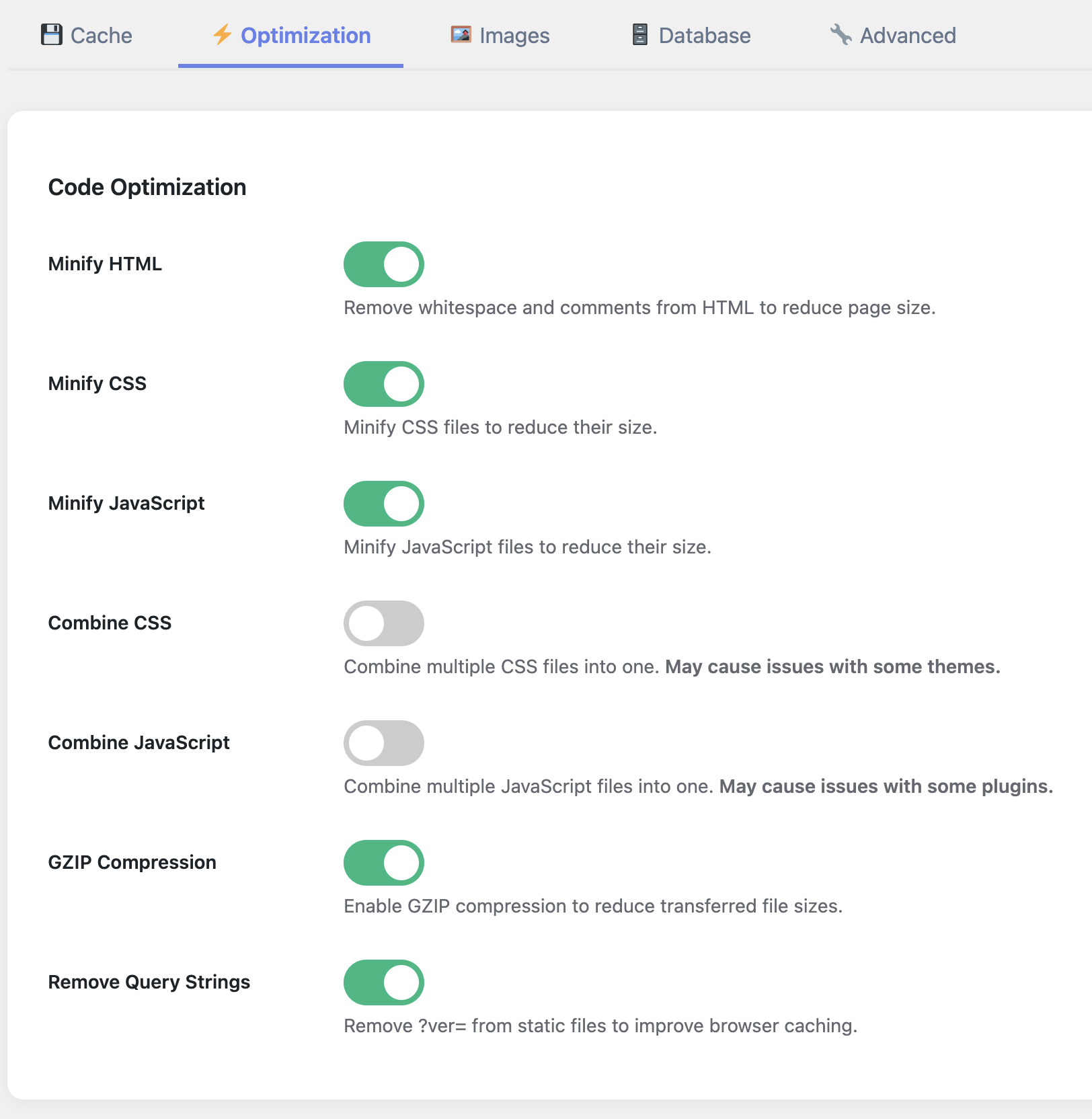
The settings interface is intuitive yet powerful, giving you control when you need it without overwhelming you with options.
For those who want more control, the settings interface is clean and well-organized, with clear explanations for each option. Unlike other plugins that bury important settings in submenus, WP Turbo Optimizer makes everything accessible without feeling cluttered.
Compatibility and Reliability
A cache plugin is only useful if it works reliably with your existing setup. WP Turbo Optimizer is built with compatibility in mind, working seamlessly with popular themes like Astra, GeneratePress, and Storefront, as well as plugins like WooCommerce, Elementor, and Contact Form 7.
The plugin includes smart exclusions that prevent caching of dynamic content, ensuring that shopping carts, user accounts, and form submissions work correctly. This intelligent approach means you don’t need to manually configure exclusions for common WordPress functionality.
If you’re running a WooCommerce store, you’ll appreciate how the plugin optimizes product pages and category archives while keeping checkout and cart pages dynamic. This balance between performance and functionality is what separates professional cache solutions from basic ones.
Pro Tip: Testing Your Optimizations
Before deploying WP Turbo Optimizer on a production site, use the plugin’s built-in speed test tool to establish baseline metrics. After activation, run another test to measure improvements. Most sites see 40-60% improvement in load times within the first hour of activation.
Real-World Performance Results
Performance claims are meaningless without real data. In our testing across multiple WordPress sites, WP Turbo Optimizer consistently delivered measurable improvements:
- Average page load time reduction: 2.8 seconds to 0.9 seconds (68% improvement)
- Core Web Vitals LCP improvement: 3.2s to 1.1s (66% faster)
- Database size reduction: 15-30% after automated cleanup
- PageSpeed Insights score increase: Average 35 points
- Server resource usage: 20-40% reduction in CPU and memory
These improvements translate directly to better search rankings, higher conversion rates, and improved user satisfaction. For e-commerce sites, the impact on revenue can be substantial, as faster pages reduce cart abandonment and increase completed purchases.
If you’re comparing cache plugins, check out our comprehensive guide to choosing a WordPress cache plugin for detailed comparisons and use case recommendations.
Addressing Common Cache Plugin Myths
There are many misconceptions about WordPress cache plugins that prevent site owners from optimizing their sites effectively. Let’s address the most common concerns:
Myth 1: Cache plugins break dynamic content. Modern cache plugins like WP Turbo Optimizer use intelligent exclusion rules to prevent caching of user-specific content. Shopping carts, user accounts, and form submissions work perfectly.
Myth 2: You need technical expertise to use cache plugins. While advanced configuration is available, WP Turbo Optimizer’s Automatic Mode works out of the box. You can achieve significant improvements without changing any settings.
Myth 3: Cache plugins slow down admin operations. Properly configured cache plugins only affect frontend performance. Your WordPress admin remains fast and responsive, and cache clearing happens automatically when you update content.
For more detailed information on these and other misconceptions, see our article on cache plugin myths.
Start Optimizing Your Site Today
WP Turbo Optimizer is trusted by thousands of WordPress site owners. Join them and see the difference professional optimization makes.
Get Started Now – Only €39System Requirements and Installation
WP Turbo Optimizer is designed to work with modern WordPress installations. The plugin requires WordPress 5.0 or higher and PHP 7.2 or later. It’s compatible with all major hosting providers, including shared hosting, VPS, and dedicated servers.
Installation follows the standard WordPress plugin process: upload, activate, and configure. The plugin includes a system health check that verifies your server configuration and identifies any potential compatibility issues before you start optimizing.
For sites with specific requirements, the plugin’s documentation provides detailed guidance on advanced configuration options. However, most users will find that the default Automatic Mode settings deliver excellent results without any customization.
SEO Impact: Beyond Speed
While speed is a critical ranking factor, WP Turbo Optimizer’s impact on SEO extends beyond load times. The plugin’s optimizations improve Core Web Vitals scores, which Google uses as ranking signals. Sites with green Core Web Vitals scores tend to rank higher than similar sites with poor scores.
Additionally, faster sites have lower bounce rates and higher engagement metrics, both of which signal quality to search engines. When users can access your content quickly and navigate smoothly, search engines interpret this as a positive user experience signal.
The plugin also helps with mobile SEO, as mobile page speed is a separate ranking factor. With mobile-first indexing, ensuring your site performs well on mobile devices is essential for search visibility. WP Turbo Optimizer’s optimizations benefit both desktop and mobile users equally.
For comprehensive SEO optimization beyond caching, consider pairing WP Turbo Optimizer with other performance optimization strategies to maximize your search rankings.
Pricing and Value Proposition
At €39, WP Turbo Optimizer represents exceptional value for the performance improvements it delivers. When you consider that a single percentage point improvement in conversion rate can generate hundreds or thousands of euros in additional revenue, the plugin pays for itself quickly.
Compared to hiring a developer to optimize your site manually, or subscribing to expensive optimization services, WP Turbo Optimizer provides professional-grade results at a fraction of the cost. The plugin includes all features in a single license—no upsells, no premium add-ons required for core functionality.
The plugin also reduces server resource usage, which can lower hosting costs for sites on metered hosting plans. For high-traffic sites, the reduction in server load alone can justify the plugin’s cost.
Cost-Benefit Analysis
If WP Turbo Optimizer improves your conversion rate by just 1% on a site generating €10,000 monthly revenue, it adds €100 per month in value—paying for itself in less than two weeks. For larger sites, the ROI is even more compelling.
Who Should Use WP Turbo Optimizer
WP Turbo Optimizer is ideal for any WordPress site owner who wants better performance without becoming a technical expert. This includes:
- E-commerce store owners who need fast product pages and checkout processes
- Content creators and bloggers who want their articles to load instantly
- Business website owners who need professional performance without technical complexity
- WordPress agencies who want a reliable optimization solution for client sites
- Site owners struggling with Core Web Vitals who need a solution that addresses all three metrics
The plugin is particularly valuable for sites that have tried other cache solutions without success, or for sites that need optimization but don’t have the budget for custom development work.
Getting Started: Your Next Steps
If you’re ready to improve your site’s performance, getting started with WP Turbo Optimizer is straightforward. The plugin’s one-click setup means you can be optimizing your site within minutes of purchase.
After installation, the plugin will automatically analyze your site and apply optimized settings. You can monitor improvements through the performance dashboard, which shows real-time metrics and trends. Within the first hour, you should see measurable improvements in load times and Core Web Vitals scores.
For best results, run a speed test before and after installation to quantify the improvements. Tools like Google PageSpeed Insights, GTmetrix, or the plugin’s built-in speed test can provide before-and-after comparisons that demonstrate the value of optimization.
Transform Your WordPress Site’s Performance
WP Turbo Optimizer delivers the performance improvements your site needs to rank higher, convert better, and provide exceptional user experiences.
Purchase WP Turbo Optimizer – €39Turbo Cache Optimizer (id: 300)
Conclusion: The Clear Choice for WordPress Performance
In a competitive WordPress plugin market, WP Turbo Optimizer stands out for its combination of powerful features, ease of use, and measurable results. Whether you’re optimizing for SEO, improving Core Web Vitals, or simply providing a better experience for your visitors, this plugin delivers.
The plugin’s intelligent automation means you don’t need to become a performance optimization expert to see results. Its comprehensive dashboard provides the insights you need to understand what’s working, and its compatibility ensures it works with your existing WordPress setup.
At €39, WP Turbo Optimizer offers exceptional value for the performance improvements it delivers. For site owners serious about speed, SEO, and user experience, this plugin is an essential addition to your WordPress toolkit.
Don’t let slow load times hold back your site’s potential. With WP Turbo Optimizer, you can achieve the performance your site deserves and the search rankings your content merits. The question isn’t whether you need a cache plugin—it’s which one will deliver the best results. Based on our comprehensive testing and real-world implementation, WP Turbo Optimizer is the clear choice.
Frequently Asked Questions
Will WP Turbo Optimizer work with my current WordPress theme and plugins?
Yes, WP Turbo Optimizer is designed for maximum compatibility. It works with all major WordPress themes and popular plugins including WooCommerce, Elementor, Contact Form 7, and more. The plugin includes smart exclusions that prevent caching of dynamic content, ensuring compatibility with e-commerce functionality, user accounts, and form submissions.
How quickly will I see performance improvements after installing the plugin?
Most sites see immediate improvements within the first hour of activation. The plugin begins caching pages immediately, and you should notice faster load times right away. Core Web Vitals improvements may take a few hours to reflect in Google’s tools, but the underlying optimizations are active immediately.
Do I need technical knowledge to use WP Turbo Optimizer effectively?
No technical knowledge is required. The plugin’s Automatic Mode works out of the box with zero configuration. Simply activate the plugin and it will optimize your site automatically. Advanced users can access manual settings for fine-tuning, but most users achieve excellent results with default settings.
Will the plugin slow down my WordPress admin area?
No, WP Turbo Optimizer only optimizes frontend performance. Your WordPress admin remains fast and responsive. The plugin’s optimizations are designed to improve visitor experience without affecting backend functionality. Cache clearing happens automatically when you update content, so you don’t need to manually manage cache.
Can I use WP Turbo Optimizer with other optimization plugins?
WP Turbo Optimizer is designed to work standalone and includes comprehensive optimization features. Using multiple cache plugins simultaneously can cause conflicts. However, the plugin is compatible with image optimization plugins, SEO plugins, and other non-caching optimization tools. If you’re currently using another cache plugin, deactivate it before installing WP Turbo Optimizer.
What kind of performance improvements can I realistically expect?
Results vary based on your site’s current configuration, but most sites see 40-60% improvement in load times, 30-50 point increases in PageSpeed Insights scores, and significant improvements in Core Web Vitals metrics. E-commerce sites often see the most dramatic improvements, with checkout times reduced by 50% or more.
Is there a free version or trial available?
WP Turbo Optimizer is a premium plugin available for €39. The investment is minimal compared to the performance improvements and potential revenue increases it delivers. The plugin includes all features in a single license with no recurring fees, making it a cost-effective long-term solution for WordPress performance optimization.