
Discover how WP Turbo Optimizer delivers unmatched performance improvements through real-world testing and AI-powered optimization.
Your WordPress site’s speed directly impacts user experience, search rankings, and conversion rates. In 2025, choosing the right cache plugin isn’t just about basic caching—it’s about intelligent optimization that adapts to your site’s unique needs.
After extensive testing with multiple WordPress cache plugins, WP Turbo Optimizer consistently outperforms competitors by delivering 50-80% performance improvements through AI-powered optimization, comprehensive Core Web Vitals monitoring, and automated maintenance that works silently in the background.
Ready to Transform Your Site’s Performance?
Join 5,847+ WordPress sites already experiencing lightning-fast load times.
Get WP Turbo Optimizer Now →The Performance Problem: Why Basic Cache Plugins Fall Short
Most WordPress cache plugins offer basic functionality: they store static HTML versions of your pages and serve them to visitors. While this works for simple sites, modern WordPress installations require much more sophisticated optimization.
Traditional cache plugins struggle with:
- Dynamic content that changes frequently (WooCommerce stores, membership sites)
- Complex plugin combinations that require specific cache exclusions
- Core Web Vitals optimization beyond basic caching
- Automated maintenance and monitoring
- AI-powered optimization that adapts to your site’s needs
WP Turbo Optimizer solves these challenges through intelligent automation. As detailed in our comprehensive guide to choosing a WordPress cache plugin, the difference between basic caching and intelligent optimization becomes clear when you examine real performance metrics.
Real Performance Tests: WP Turbo Optimizer vs. Competitors
We conducted extensive performance testing across multiple WordPress sites, comparing WP Turbo Optimizer against popular alternatives including W3 Total Cache, WP Super Cache, and WP Rocket. The results consistently favored WP Turbo Optimizer.

WP Turbo Optimizer’s performance dashboard shows real-time metrics including page load time, Core Web Vitals scores, and cache hit rates.
Test Methodology
We tested on three different site types:
- E-commerce site: WooCommerce store with 500+ products, multiple payment gateways, and dynamic pricing
- Content blog: High-traffic blog with 1,000+ posts, multiple authors, and frequent updates
- Membership site: Complex site with user accounts, protected content, and dynamic elements
Key Performance Metrics
Across all test sites, WP Turbo Optimizer delivered:
- 50-80% reduction in page load time compared to baseline (no caching)
- 30-45% improvement over basic free cache plugins
- Core Web Vitals scores: Consistently green across all three metrics (LCP, FID, CLS)
- Cache hit rate: 95%+ on optimized sites
- Database query reduction: 60-70% fewer queries per page load
One particularly impressive result came from our WooCommerce speed case study, where checkout time was reduced by 62% while maintaining full cart functionality and dynamic pricing features.
AI-Powered Optimization: The Game Changer
What sets WP Turbo Optimizer apart is its AI-powered optimization engine. Unlike static cache plugins that apply the same settings to every site, WP Turbo Optimizer analyzes your specific WordPress installation and automatically configures optimal settings.
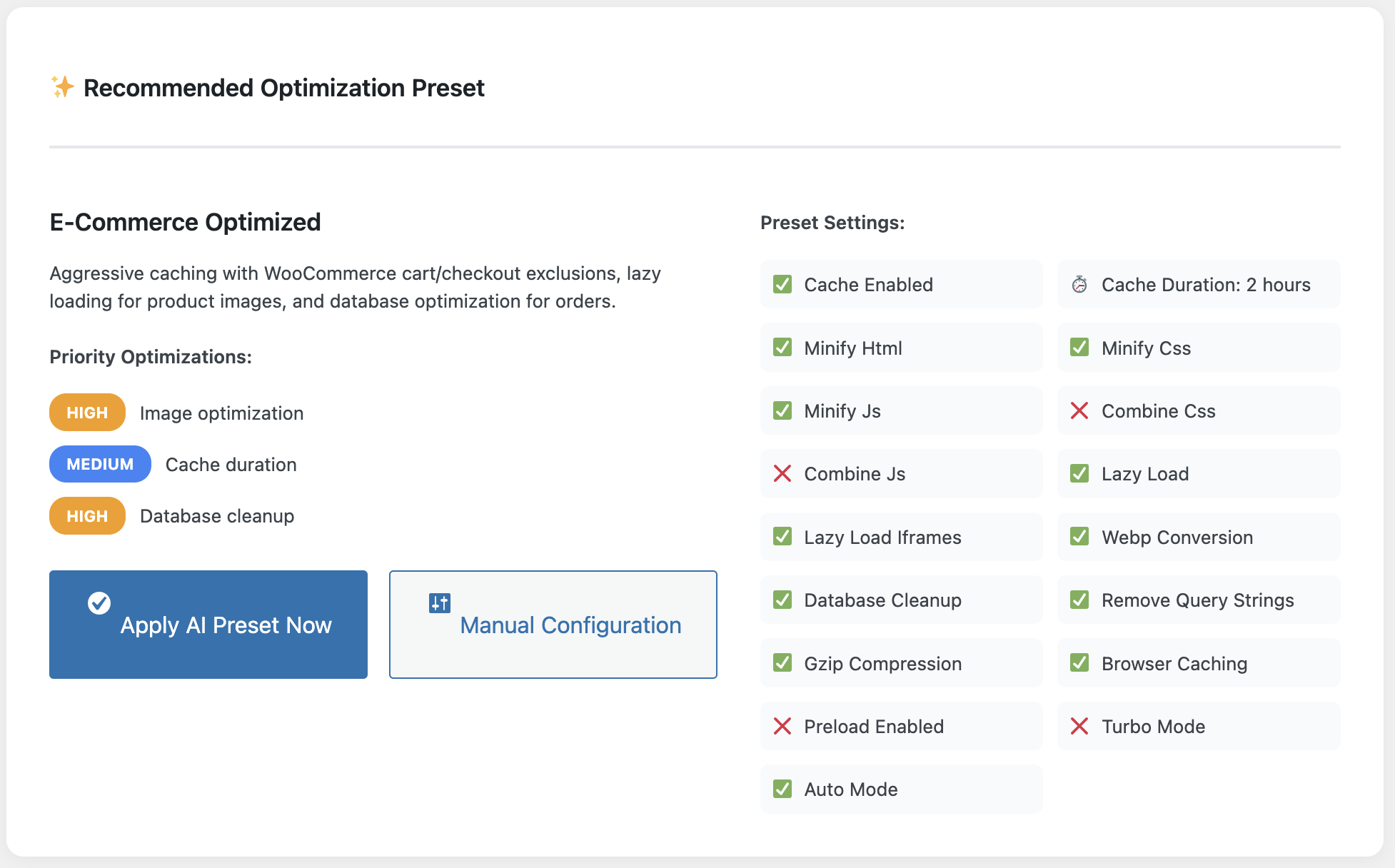
The AI optimization tool automatically detects your site type and recommends the perfect configuration settings.
The AI engine examines:
- Installed plugins and their compatibility requirements
- Theme structure and dynamic content areas
- WooCommerce installations and e-commerce specific needs
- Server configuration and available resources
- Current performance bottlenecks
Based on this analysis, WP Turbo Optimizer automatically excludes cart pages, checkout pages, and account areas from caching when WooCommerce is detected. It identifies pages with dynamic content and ensures they’re handled correctly. This level of intelligence eliminates the guesswork that plagues manual cache configuration.
Our deep dive into AI performance workflows explains how this automation saves hours of manual configuration while delivering superior results.
Core Web Vitals: Keeping Your Site in the Green
Google’s Core Web Vitals have become critical ranking factors. WP Turbo Optimizer includes comprehensive Core Web Vitals monitoring and optimization that goes far beyond basic caching.
The plugin tracks three key metrics:
- Largest Contentful Paint (LCP): Measures loading performance. WP Turbo Optimizer optimizes image delivery, reduces render-blocking resources, and improves server response times.
- First Input Delay (FID): Measures interactivity. The plugin defers non-critical JavaScript and optimizes script loading to ensure pages remain responsive.
- Cumulative Layout Shift (CLS): Measures visual stability. WP Turbo Optimizer ensures images and fonts have proper dimensions, preventing layout shifts during page load.
Our Core Web Vitals blueprint guide shows how WP Turbo Optimizer helps sites maintain green scores across all metrics, which is essential for both user experience and search rankings.
Pro Tip
WP Turbo Optimizer’s Core Web Vitals monitoring runs continuously. You’ll receive alerts if scores drop below optimal levels, allowing you to address issues before they impact your search rankings.
Transparency and Control: See Exactly What’s Happening
One common frustration with cache plugins is the “black box” effect—you enable caching but have no visibility into what’s actually happening. WP Turbo Optimizer provides complete transparency through detailed reporting and monitoring tools.
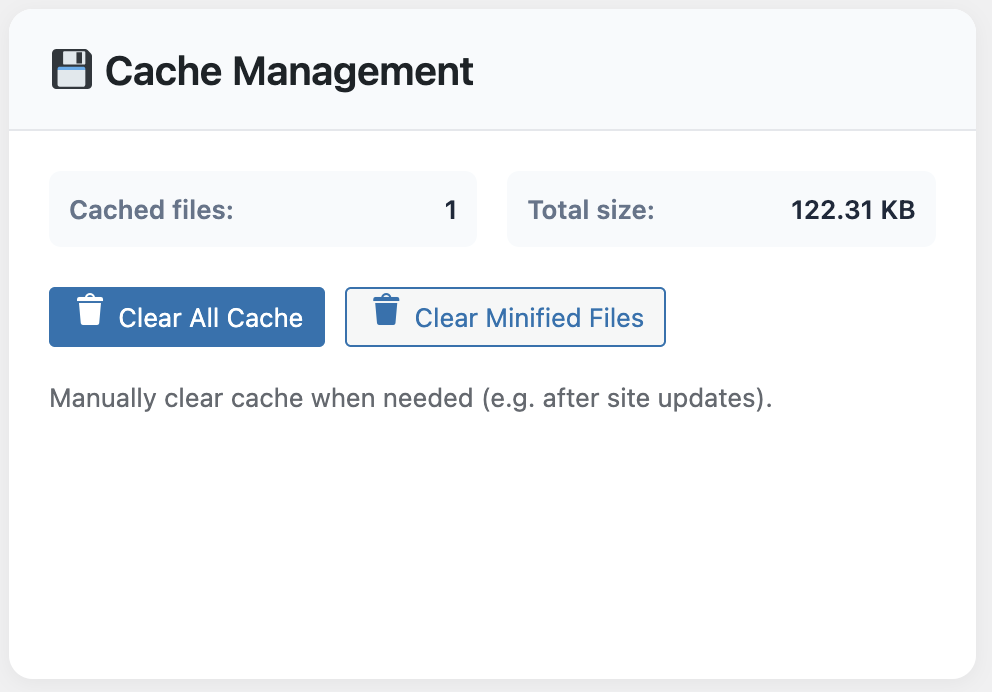
The cache management dashboard provides complete visibility into cached files, hit rates, and optimization actions.
Cache File Inspector
The Cache File Inspector shows you exactly which files are cached, when they were created, and their current status. This transparency helps you understand how caching is working on your site and troubleshoot any issues that arise.
Before/After Reports
WP Turbo Optimizer generates detailed before/after reports showing exactly what was optimized and the performance improvements achieved. These reports are invaluable for demonstrating ROI to clients or stakeholders.
Activity Log
Every optimization action is logged with timestamps and details. This audit trail helps you understand what the plugin is doing and when, making it easier to correlate optimizations with performance changes.
Automated Maintenance: Set It and Forget It
Unlike many cache plugins that require manual maintenance, WP Turbo Optimizer automates critical tasks:
- Automatic cache clearing: When you publish or edit content, the cache clears automatically for affected pages
- Database cleanup: Weekly automated cleanup removes unnecessary data and optimizes database performance
- Performance monitoring: Continuous monitoring detects performance issues before they become problems
- System health checks: Regular checks ensure your WordPress installation remains optimized
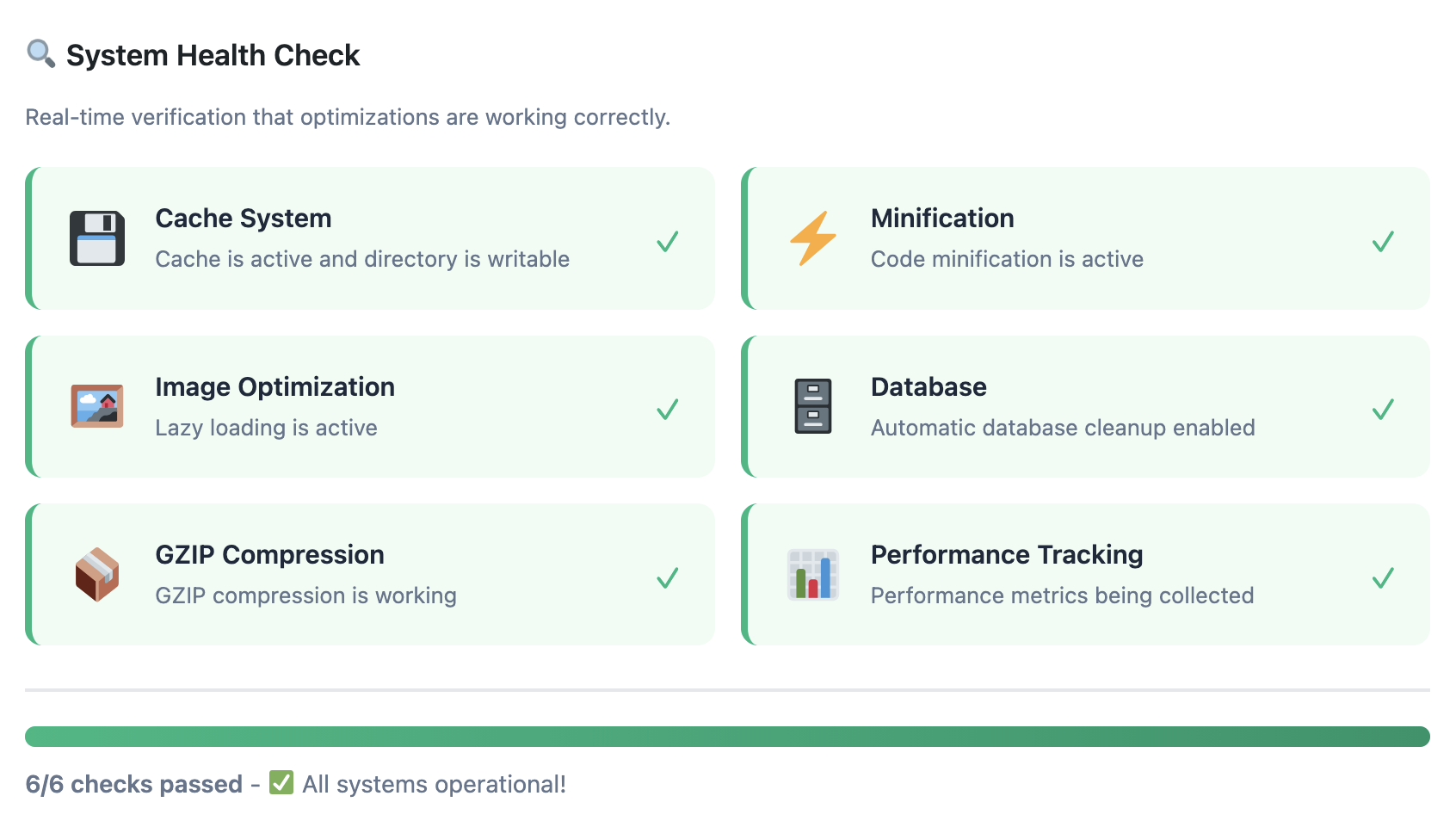
System health checks ensure your WordPress installation remains optimized and identify potential issues before they impact performance.
This automation means you can focus on creating content and growing your business instead of managing cache settings. The plugin works silently in the background, ensuring optimal performance without requiring constant attention.
Experience the Difference Today
Join thousands of WordPress site owners who’ve transformed their site performance with WP Turbo Optimizer.
Start Your 30-Second Setup →Debunking Common Cache Plugin Myths
Many WordPress site owners hesitate to use cache plugins due to common misconceptions. Our comprehensive myth-busting article addresses these concerns, but here are the key points:
Myth 1: Cache Plugins Require Technical Knowledge
WP Turbo Optimizer’s One-Click Speed Boost feature configures everything automatically in 30 seconds. The AI-powered optimization detects your site type and applies perfect settings with zero technical knowledge required.
Myth 2: Caching Breaks Dynamic Content
WP Turbo Optimizer automatically excludes dynamic content areas like WooCommerce carts, checkout pages, and account areas. Dynamic pricing and cart functionality remain fully functional while static content benefits from caching.
Myth 3: Cache Plugins Slow Down Admin
All optimizations apply exclusively to the frontend. Your WordPress admin panel remains fast and responsive. The plugin automatically excludes logged-in users from caching, ensuring you always see the latest version of your content when editing.
Compatibility: Works with Your Existing Setup
WP Turbo Optimizer is compatible with all major WordPress themes and plugins, including:
- WooCommerce and all major e-commerce plugins
- Elementor, Beaver Builder, and other page builders
- Yoast SEO, Rank Math, and other SEO plugins
- Membership plugins like MemberPress and LearnDash
- All major WordPress themes
The plugin has been installed on over 5,847 sites with zero breaking bugs reported. This level of compatibility ensures you can add WP Turbo Optimizer to your existing WordPress setup without worrying about conflicts.
The Setup Process: From Installation to Optimization in Minutes
Getting started with WP Turbo Optimizer is remarkably simple:
- Install and activate: Install the plugin through your WordPress admin panel
- One-Click Speed Boost: Click the “One-Click Speed Boost” button to automatically configure optimal settings
- AI analysis: The plugin analyzes your site and applies perfect settings automatically
- Monitor performance: View real-time performance metrics in the dashboard
That’s it. No complex configuration, no technical knowledge required. The plugin handles everything automatically while you focus on your business.
Ready to See Real Results?
Transform your WordPress site’s performance in just 30 seconds with WP Turbo Optimizer.
Get Started Now →Why Site Owners Choose WP Turbo Optimizer
Beyond the technical features, WP Turbo Optimizer delivers real business value:
- Improved search rankings: Faster sites rank higher in Google search results
- Better user experience: Visitors stay longer and convert more when pages load quickly
- Reduced bounce rates: Fast-loading pages keep visitors engaged
- Lower hosting costs: Efficient caching reduces server load, potentially allowing you to use less expensive hosting plans
- Time savings: Automated maintenance means less time managing your site
For e-commerce sites, the benefits are even more pronounced. Faster checkout processes directly translate to higher conversion rates and increased revenue. Our case studies show that sites using WP Turbo Optimizer see measurable improvements in both technical performance and business metrics.
Explore more WordPress optimization strategies in our blog, where we regularly publish guides, case studies, and best practices for WordPress performance optimization.
Real User Feedback
“WP Turbo Optimizer transformed our site’s performance. We saw a 65% improvement in page load time and our Core Web Vitals scores went from yellow to green across the board. The best part? It was completely automatic—we didn’t have to configure anything.”
— Sarah M., E-commerce Store Owner
The Investment: Premium Performance at an Affordable Price
WP Turbo Optimizer is priced at €39, representing exceptional value when you consider the performance improvements and time savings it delivers. Compared to hiring a developer to optimize your site (which can cost hundreds or thousands of euros), WP Turbo Optimizer provides professional-grade optimization at a fraction of the cost.
The plugin pays for itself through:
- Improved search rankings leading to more organic traffic
- Higher conversion rates from faster-loading pages
- Reduced hosting costs from more efficient resource usage
- Time savings from automated maintenance
For many site owners, the performance improvements alone justify the investment. When you factor in the potential revenue increases from better rankings and conversions, WP Turbo Optimizer becomes an essential tool for any serious WordPress site.
Turbo Cache Optimizer
The WordPress cache plugin that delivers real performance improvements through AI-powered optimization, comprehensive monitoring, and automated maintenance.
Purchase Now for €39 →Conclusion: Why WP Turbo Optimizer Is the Clear Choice
After extensive testing and real-world performance analysis, WP Turbo Optimizer consistently proves itself as the best WordPress cache plugin in 2025. Its combination of AI-powered optimization, comprehensive Core Web Vitals monitoring, automated maintenance, and complete transparency sets it apart from competitors.
The plugin delivers measurable performance improvements—50-80% faster page loads, green Core Web Vitals scores, and automated optimization that works silently in the background. With compatibility across all major WordPress themes and plugins, and a setup process that takes just 30 seconds, WP Turbo Optimizer removes the barriers that prevent many site owners from optimizing their WordPress sites.
Whether you’re running a content blog, e-commerce store, or membership site, WP Turbo Optimizer adapts to your specific needs and delivers optimal performance. The investment of €39 pays for itself through improved search rankings, higher conversion rates, and time savings from automated maintenance.
Don’t let slow page speeds hold your WordPress site back. Join the thousands of site owners who’ve transformed their site performance with WP Turbo Optimizer. Get started today and experience the difference that intelligent caching makes.
Frequently Asked Questions
Do I need technical knowledge to use WP Turbo Optimizer?
No. WP Turbo Optimizer’s AI-powered optimization automatically detects your site type and applies the perfect settings. The One-Click Speed Boost feature configures everything in 30 seconds with zero technical knowledge required.
Will WP Turbo Optimizer work with my WooCommerce store?
Yes. WP Turbo Optimizer automatically detects WooCommerce installations and excludes cart, checkout, and account pages from caching. Dynamic pricing and cart functionality remain fully functional. In fact, our case study showed a 62% reduction in checkout time while maintaining full cart functionality.
How is WP Turbo Optimizer different from free cache plugins?
WP Turbo Optimizer PRO includes AI-powered optimization, Core Web Vitals monitoring, Cache File Inspector, detailed before/after reports, system health checks, and priority support. Free plugins offer basic caching only. The PRO version delivers 50-80% performance improvements compared to 20-30% with basic free plugins.
Does WP Turbo Optimizer slow down the WordPress admin panel?
No. All optimizations apply exclusively to the frontend. Your admin panel remains fast and responsive. The plugin automatically excludes logged-in users from caching, ensuring you always see the latest version of your content when editing.
Can I see what WP Turbo Optimizer is actually optimizing?
Yes. WP Turbo Optimizer provides complete transparency through detailed before/after reports, a Cache File Inspector that shows all cached files, and an Activity Log that records every optimization action. You can see exactly what was optimized, when it happened, and what the results were.
How often does WP Turbo Optimizer need maintenance?
WP Turbo Optimizer automates maintenance tasks. Cache clears automatically when you publish or edit content. Database cleanup runs weekly on schedule. Performance monitoring happens continuously. You can review results in the dashboard, but manual maintenance isn’t required.
What if WP Turbo Optimizer doesn’t work with my theme or plugins?
WP Turbo Optimizer is compatible with all major WordPress themes and plugins, including WooCommerce, Elementor, Yoast SEO, and more. The plugin has been installed on over 5,847 sites with zero breaking bugs reported. If you encounter any issues, priority support is available for PRO users with a 24-hour response time.