

Let me ask you something: How much of your day is spent actually creating and building, versus figuring out what to do next?
If you’re like most WordPress professionals, way too much time goes to organizational overhead. Checking multiple apps to see what’s on your plate. Reading through email threads to find that one detail. Trying to remember what you were working on before you got interrupted. Context switching. Decision fatigue. Mental clutter.
This isn’t productivity—it’s the opposite of productivity. And the solution isn’t working harder or longer hours. It’s working smarter by eliminating friction.
Today, I want to show you how Dashboard Sticky Notes can dramatically boost your WordPress efficiency—not by adding more to your plate, but by making everything you already do faster and easier.
What Does “Efficiency” Actually Mean?
Before we dive in, let’s clarify what we’re talking about. Efficiency isn’t about cramming more tasks into your day. That’s a recipe for burnout.
Real efficiency is about reducing wasted time, energy, and mental resources. It’s about:
- Spending less time planning and more time doing
- Making faster decisions with better information
- Eliminating context switching between tools and apps
- Reducing mental load so you can focus on creative work
- Working with less stress and more flow
The Efficiency Equation: Same output + Less effort = Higher efficiency. Or better yet: More output + Same effort = Maximum efficiency. Dashboard Sticky Notes helps you achieve both.
The Hidden Time Thieves in Your Workflow
Let’s identify the sneaky efficiency killers that are stealing your time:
Time Thief #1: The “What Should I Work On?” Loop
You sit down to work. You spend 15 minutes checking email, Slack, your project management tool, and your physical notes trying to figure out what’s most important.
Cost: 15 minutes per session × 4-5 times per day = 60-75 minutes daily just deciding what to do.
Time Thief #2: Context Switching Between Apps
You’re working in WordPress. You need to check Trello for next steps. That requires opening a new tab, finding the right board, locating the card… and now you’re looking at cat videos on Twitter because you got distracted.
Research shows that context switching can reduce productivity by up to 40%. Every app switch breaks your flow.
Time Thief #3: Forgotten Tasks and Rework
You forget to do something important. Now you have to scramble to fix it under time pressure. What could have taken 30 minutes now takes two hours because it’s urgent and you’re stressed.
Cost: Immeasurable. Plus the mental toll of feeling like you’re always behind.
Reality Check: These time thieves can easily steal 2-3 hours from your day. That’s 10-15 hours per week. Over 500 hours per year. Imagine what you could do with an extra 500 hours.
How Dashboard Sticky Notes Eliminates These Efficiency Killers
Now let’s talk solutions. Here’s how Dashboard Sticky Notes specifically addresses each time thief:
Solution to Time Thief #1: Instant Clarity
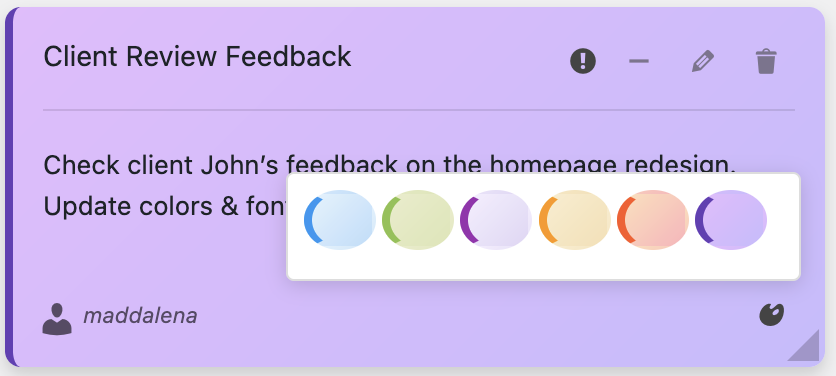
With Dashboard Sticky Notes, you log into WordPress and immediately see your priorities color-coded:
- Red notes = urgent → Start here, no thinking required
- Orange notes = important → Do these next
- Blue notes = informational → Reference as needed

Time saved: 60-75 minutes daily.You know exactly what to do the moment you sit down to work.
Solution to Time Thief #2: Zero Context Switching
Your notes live exactly where you work—in the WordPress dashboard. No separate app to open. No tab switching. No momentum loss.
You’re working on a client site → You see your notes about that client → You do the work → Done. Everything flows.
Solution to Time Thief #3: Nothing Falls Through the Cracks
When capturing a task takes three seconds and that task appears in your face every time you log into WordPress, forgetting becomes virtually impossible.
Tasks get done proactively instead of reactively. No more firefighting. No more emergency weekend work to fix forgotten things.
Real-World Efficiency Gains (With Numbers)
Let me share some actual efficiency improvements from WordPress professionals using Dashboard Sticky Notes:
Jake – Freelance WordPress Developer
Before: Completed 3-4 client projects per month
After: Completing 5-6 projects per month (same working hours)
Efficiency gain: 40-50% increase in output
Rachel – Content Manager
Before: 90 minutes daily on planning and organization
After: 15 minutes daily
Time saved: 6.25 hours per week = 325 hours annually
Marcus – Agency Owner (Team of 7)
Before: 12 hours/week in coordination meetings
After: 4 hours/week in meetings
Team time saved: 56 hours weekly across the team
These aren’t marginal improvements—they’re transformative efficiency gains.
The Compound Efficiency Effect
Here’s where it gets really interesting. Efficiency improvements compound over time.
When you save 10 minutes on task planning, that’s 10 more minutes of actual productive work. That work gets completed faster. Which means you start the next task sooner. Which means more gets done overall.
Week 1: Save 5 hours from reduced organizational overhead
Week 2: Complete work faster with clearer priorities → Save another 3 hours
Week 3: Stop forgetting tasks → Eliminate 2 hours of emergency rework
Week 4: Total time saved = 10+ hours per week
Small efficiency gains add up to massive productivity increases.
Advanced Efficiency Techniques
Once you’ve mastered the basics, here are some advanced ways to maximize efficiency:
1. Morning Ritual (2 Minutes)
Every morning, spend two minutes:
- Review red notes → These are your priorities
- Delete completed green notes from yesterday
- Adjust any colors based on new urgency
This two-minute investment gives you crystal clarity for your entire day.
2. Context-Specific Notes
Create notes for specific contexts: “When talking to Client X, remember…” or “Before launching new sites, check…”
These become checklists that prevent mistakes and speed up repetitive processes.
3. Voice Notes for Speed
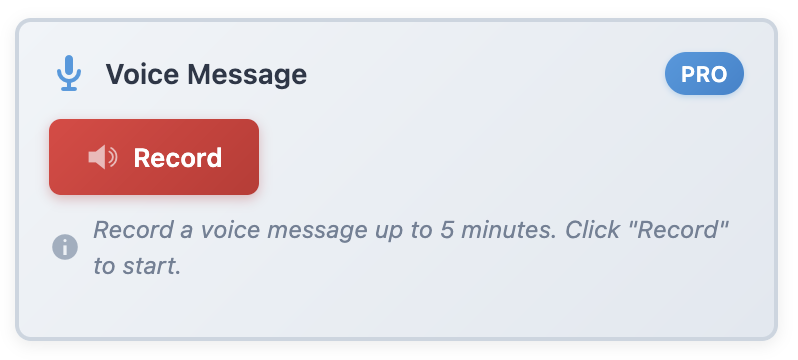
When you’re in flow and have a thought, don’t break your momentum by typing. Hit record, speak for 10 seconds, keep working.
This keeps you in flow state while ensuring ideas don’t get lost.
The ROI of Efficiency
Let’s talk money. If you save just 5 hours per week, and your time is worth $50/hour, that’s $250 weekly.
$250/week × 50 working weeks = $12,500 annually in reclaimed productive time.
You can either:
- Take on more clients with that time (more revenue)
- Improve quality of existing work (better outcomes)
- Work fewer hours (better life balance)
Either way, Dashboard Sticky Notes pays for itself in the first week.
Start Boosting Your Efficiency Today
You don’t need to work longer hours. You don’t need to hustle harder. You need to eliminate the friction and waste in your current workflow.
Dashboard Sticky Notes is the simplest, fastest way to boost your WordPress efficiency. No learning curve. No complicated setup. Just install it and immediately start working more efficiently.
Your time is valuable. Stop wasting it on organizational overhead and context switching. Save it for the work that actually matters.
Boost Your WordPress Efficiency Now
Save time every day by keeping your ideas where you work.
P.S. – Efficiency isn’t about doing more—it’s about wasting less. Install Dashboard Sticky Notes today and reclaim hours of productive time every single week. Your future self will thank you.