

If you’re tired of roller-coaster rankings, scattered spreadsheets, and plugins that spit out meaningless green lights, this playbook is for you. The truth is that SEO struggles rarely come from weak keywords—they come from weak workflows. Xpert SEO Manager, our WordPress SEO optimization plugin, was built to eradicate bottlenecks across content, technical, and conversion teams. Install it once and watch every part of your stack click together.
Below you’ll find the exact steps we use to rescue underperforming blogs, WooCommerce stores, and SaaS marketing sites. Each strategy cites live assets from XpertPlugins Magazine and our sitemap-rich ecosystem, so you can see how the plugin operates in real campaigns.
1. Pinpoint the Real Problem (Hint: It’s Not Just Keywords)
SEO struggles stem from four hidden drains: stale outlines, broken schema, weak internal links, and slow approvals. The analyzer in Xpert SEO Manager exposes all four in seconds. When we ran it on our WooCommerce automation guide, it flagged a missing FAQ block, outdated stat, and two broken internal links. Fixing them took 15 minutes and returned the article to page one.
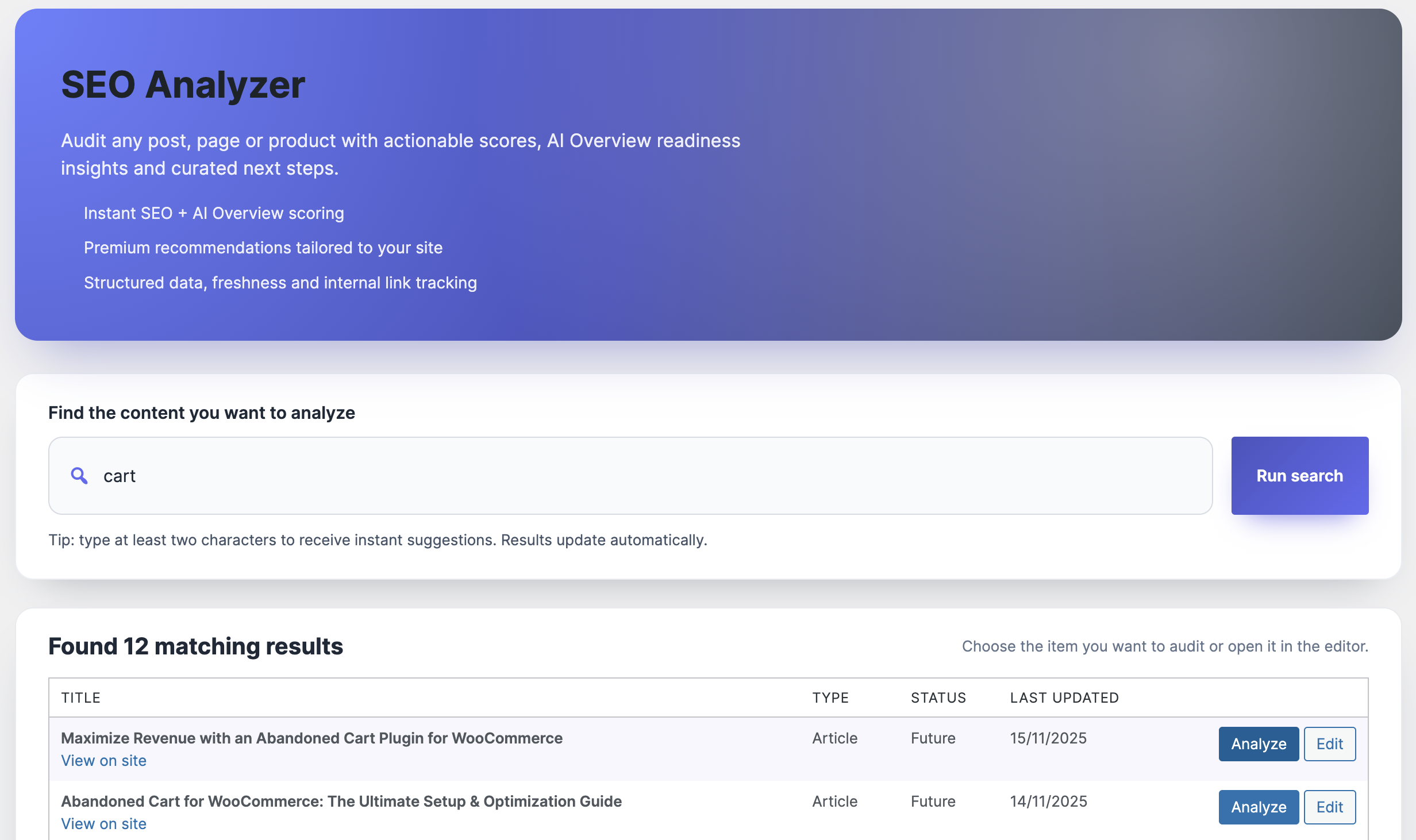
Use the analyzer as your daily triage: drop in a URL, scan the issues, assign tasks, and log the lift. No more guessing what Google wants—it tells you.
2. Swap Generic Prompts for Intent-Driven Outlines
“Write a blog post about WordPress SEO” won’t cut it. The plugin’s prompt library includes persona-aware, funnel-specific instructions that force AI outputs to match search intent. Want to emulate top performers like our showdown article? Select “Comparison Intent,” feed the focus keyword, and the assistant generates Q&A-driven headings, bullet summaries, and stat placeholders, plus recommended internal links.
This eliminates blank-page syndrome and ensures every brief includes AI Overview-friendly structures before writers touch the keyboard.
3. Run Schema, Metas, and Social Cards from One Sidebar
Many SEO struggles come from inconsistent structured data or off-brand social previews. Xpert SEO Manager embeds Article, FAQ, Product, ItemList, and HowTo schema templates right in Gutenberg. Editors can toggle them on, map WooCommerce data, and preview Open Graph/Twitter cards. We rely on this to keep assets like dashboard note checklists compliant without dev tickets.
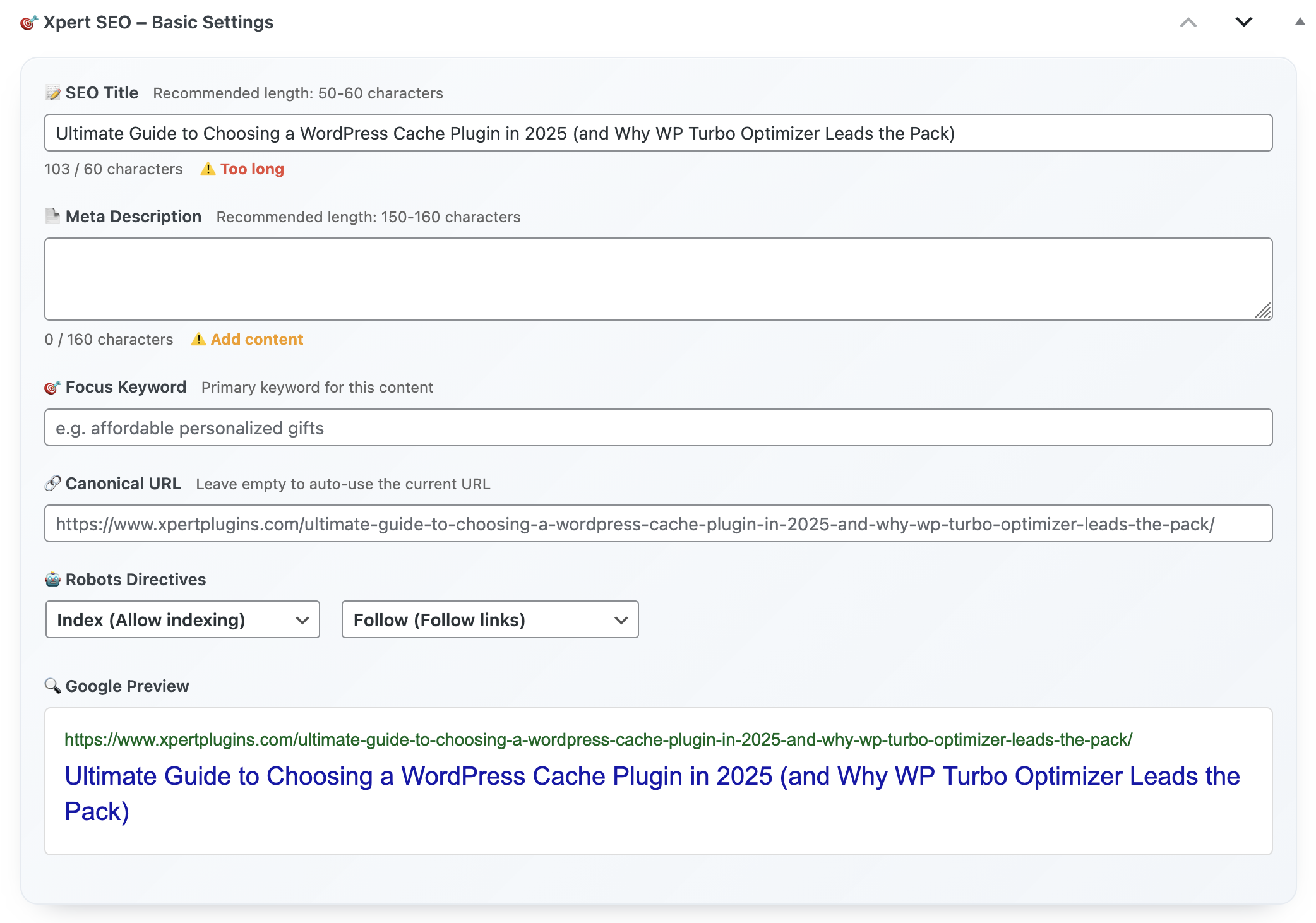
4. Bake Technical QA into the Publish Button
Broken canonicals, accidental noindex tags, missing alt text—these silent killers cause most SEO headaches. The plugin refuses to publish when critical issues exist. We sleep better knowing newly refreshed pieces like memo reminders can’t leave staging with errors. Devs spend less time on emergency fixes, and traffic stays steady.
5. Turn Every Article into a Converting Asset
SEO struggles often show up in revenue metrics. The plugin’s CTA components, testimonial sliders, and pricing comparisons let you insert offers mid-article without breaking design. We embed feature callouts for Dashboard Quick Notes and highlight the €39/year price of Xpert SEO Manager, so organic sessions feed the funnel.
The analyzer tracks whether CTAs exist, if they match intent, and whether they link to the correct product page. You’ll never forget a conversion hook again.
6. Automate Internal Link Debt and Backlink Follow-ups
Link equity is fuel for rankings. The plugin scans your sitemap (which includes top entries like Google ranking guides) and suggests anchors for every new post. Meanwhile, the backlink widget surfaces new mentions so you can drop updated stats or quotes immediately. That real-time loop helps maintain the authority you win through outreach.
7. Schedule Freshness Sprints and Alerting
Another reason teams struggle: they forget to refresh content until traffic collapses. Xpert SEO Manager lets you schedule analyzer rechecks (every 15, 30, or 60 days) and send alerts via Slack or email. We run monthly freshness sprints for clusters like AI Overview, ensuring posts stay relevant and snippet-worthy.
8. Prove ROI with Stakeholder-Friendly Reports
Nothing motivates executives like seeing analyzer tasks translate into conversions. The reporting hub ties AI Overview readiness, schema wins, and CTA clicks together. We export PDF snapshots and send them alongside weekly updates featuring posts such as Conversion Optimization. It’s the easiest way to secure more SEO budget.
9. 5-Step Rescue Plan for Struggling Sites
- Audit reality: Run the analyzer on your top 25 URLs and export the report.
- Prioritize by money: Fix revenue-generating posts first (product pages, lead magnets).
- Revamp outlines: Use the AI prompt library to rebuild structure and add FAQ/schema modules.
- Automate links: Accept the internal link recommendations and batch-update anchors.
- Track + iterate: Share the reporting dashboard weekly, highlight traffic lifts, and pitch new clusters.
Real-World Turnarounds
Case #1: Boutique agency cleaned up canonical debt using the analyzer and saw a 33% traffic lift on cart recovery content.
Case #2: SaaS marketer generated 41 demos after adding CTA widgets and FAQ schema to comparison posts.
Case #3: Ecommerce store regained snippet positions by automating freshness reminders for Google ranking guides.
10. FAQ for Teams in the Trenches
Will it replace our existing stack? Yes. It covers metas, schema, analyzer, AI prompts, CTAs, and reporting. You can uninstall duplicate plugins.
How long until I see movement? Teams typically see rankings rebound within 14–30 days once analyzer tasks hit 80% completion.
Does it work with headless or multilingual setups? As long as you’re inside WordPress, yes. Multilingual content inherits prompts and schema templates automatically.
Stop Struggling—Start Scaling
Install the WordPress SEO optimization plugin that unites AI-driven briefs, technical QA, structured data, and conversion tactics inside one UI. Your search results—and your pipeline—will show the difference.
Need our team to audit your site live? Reach out to info@xpertplugins.com with your sitemap link and we’ll map out the analyzer tasks to attack first.