

Installing a WordPress SEO plugin is easy. Turning it into a growth engine requires discipline, structure, and playbooks that teams actually follow. Below is the exact onboarding sequence we deploy whenever we roll out Xpert SEO Manager on new sites—complete with checklists, configuration screenshots, and internal link prompts. Follow it to unlock full AI Overview visibility and tie every optimization to revenue.
Phase 0 – Pre-Launch Audit (Day 0)
Before touching settings, snapshot your current performance. Export key metrics from Search Console and note which URLs matter most—think evergreen pieces like cache plugin guides or high-revenue landing pages such as abandoned cart recovery. This gives you a baseline and clarifies priorities for the analyzer.
Phase 1 – Installation & Core Settings (Day 1)
- Install the plugin ZIP from your XpertPlugins account. Activate it from the Plugins menu.
- Visit Settings → Xpert SEO AI and connect your OpenAI or Anthropic API key.
- Define your default brand tone, CTA style, and target language (we keep ours aligned with the copy used in Dashboard customization guides).
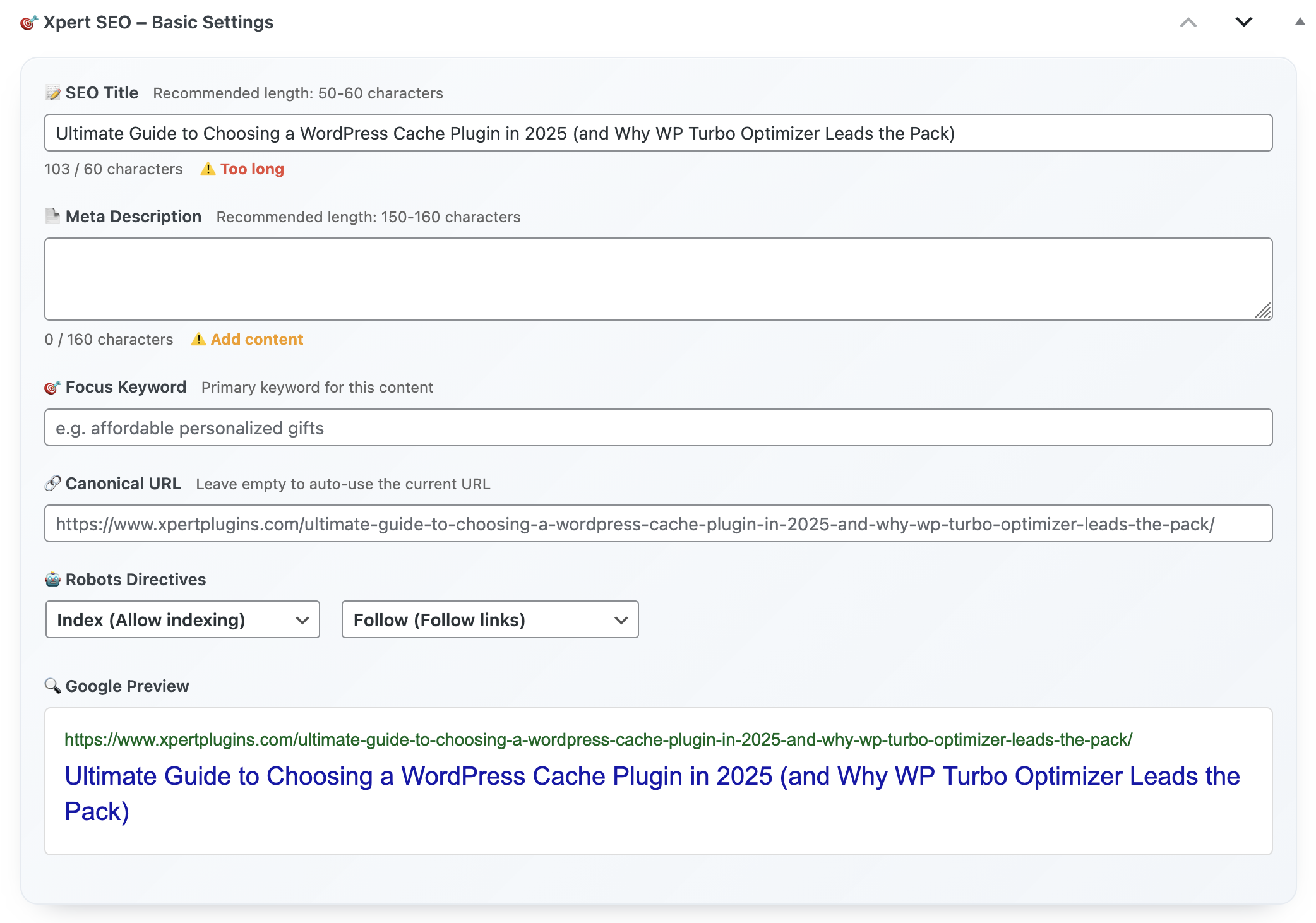
- Enable canonical enforcement, robots overrides, and schema validation under the Technical tab.
- Import the pre-built playbook (downloadable from your customer dashboard) to load AI prompts, analyzer thresholds, and schema defaults.
Phase 2 – Analyzer Calibration (Day 2)
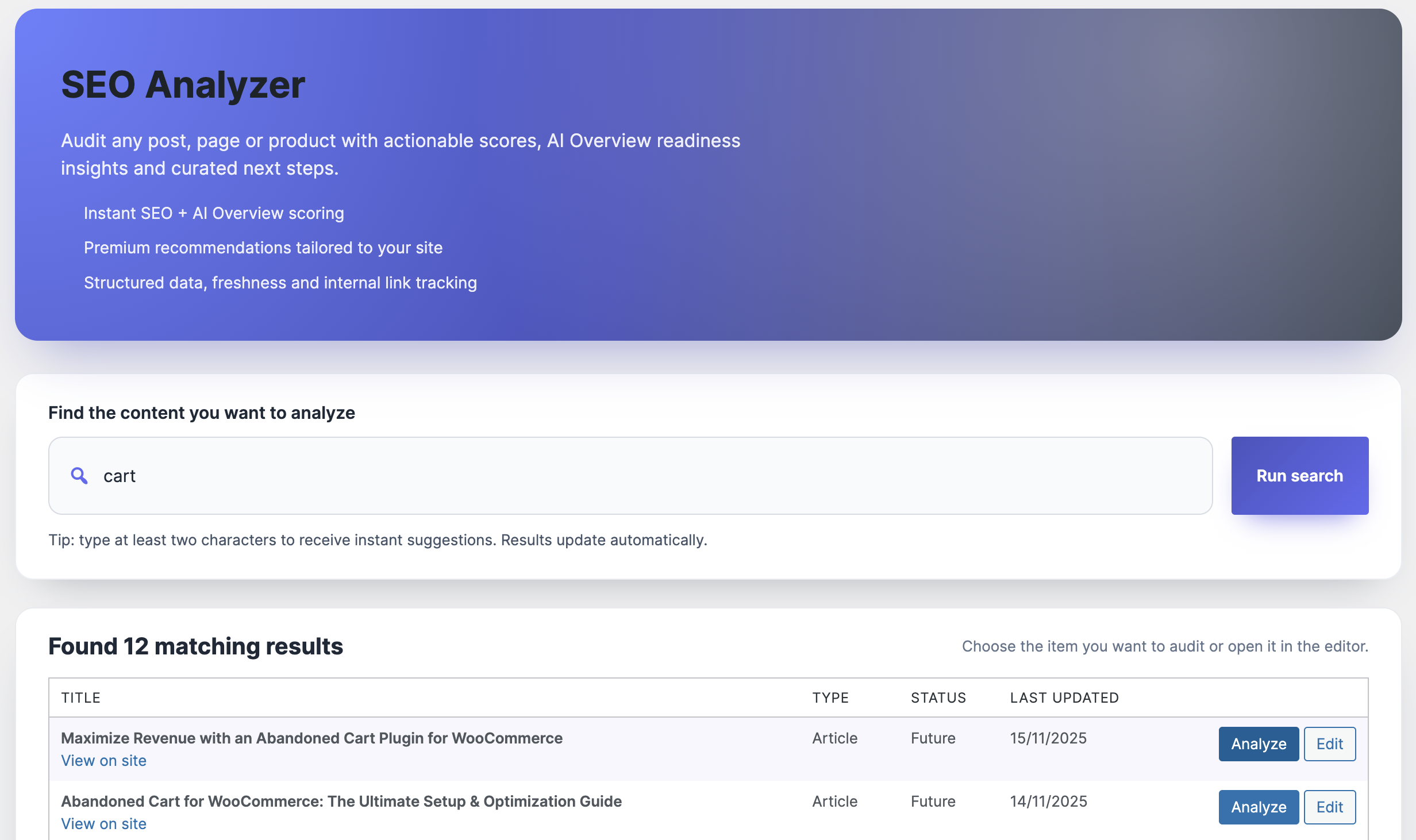
Open your top 15 posts. Run the analyzer and tag each suggestion by severity. You’ll see callouts for missing schema, internal links, AI Overview gaps, or technical conflicts. We assign owners immediately: editors handle copy/FAQ tasks, SEO leads fix canonicals, devs tackle template-level issues. This collaborative triage is how we refreshed “Reduce cart abandonment” in a single sprint.
Phase 3 – Schema & Open Graph Blueprint (Week 1)
Switch on Article + FAQ schema for informational posts, Product schema for sales pages, and ItemList schema for comparisons. The builder inside Xpert SEO Manager auto-fills fields using WooCommerce data and custom fields. Validate once and save as a reusable template. For example, we mapped the Product schema for Turbo Cache Optimizer so editors can reuse it with new bundle launches.
Phase 4 – AI Prompt Adoption (Week 2)
Train your writers to start every outline inside the plugin. Select the content intent (comparison, educational, alternative, launch) and let the prompt deliver section suggestions, internal link cues, and CTA placements. During our launch of the SEO showdown, AI prompts recommended highlighting testimonial quotes plus linking to category hubs like Plugin Stack. That nuance elevated the article into AI Overview results.
Phase 5 – Internal Link Orchestration (Week 3)
Activate the internal link recommender. It scans your sitemap (including deep resources like dashboard productivity) and suggests anchors for each new post. We schedule a weekly “link debt” session where editors add the recommended anchors before content ships. This strengthens clusters and helps Google crawl your network faster.
Phase 6 – Automation & Alerts (Week 4)
Use the scheduler to re-run analyzer checks every 30 days on money pages. Turn on Slack/email alerts for sudden drops in AI Overview readiness or schema failures. When our Google rankings hub lost its FAQ enhancement, the alert gave us a two-hour head start on the fix.
Phase 7 – Reporting & Stakeholder Alignment (Week 5)
Export the built-in dashboard, which ties analyzer scores, AI placements, and conversions together. Present it during growth meetings so executives see why SEO tasks deserve sprint time. We highlight wins tied to posts like remote team workflows to prove ROI.
Phase 8 – Continuous Improvement (Ongoing)
- Freshness cadence: Refresh at least five evergreen posts per month.
- Cluster expansion: Use analyzer keyword gaps to pitch new content for categories like AI Overview.
- Playbook export: After every major campaign, export settings and share them with partner teams.
- Support sync: Check in with info@xpertplugins.com to review roadmap updates.
Setup Checklist (Printable)
- Baseline metrics + URL priorities
- Install & connect AI provider
- Import playbook and calibrate analyzer
- Deploy schema templates + OG previews
- Adopt AI prompts and internal link recommendations
- Automate freshness alerts + reporting exports
- Share results and iterate every sprint
Launch Your SEO Command Center Today
With this step-by-step plan, your team can install, configure, and scale Xpert SEO Manager in under a week—without waiting for dev resources.
Need help implementing across multiple sites? Our team can guide you through the entire rollout—just send a note to info@xpertplugins.com with your site list and timeline.