

Need rankings fast? You won’t get them by refreshing meta descriptions or stuffing keywords. You get them by installing a command center that audits, rewrites, and relaunches content with AI-era precision. Xpert SEO Manager is the WordPress SEO optimization plugin we built to move URLs from page two to page one in record time. Here’s the rapid-execution plan we hand to every client.
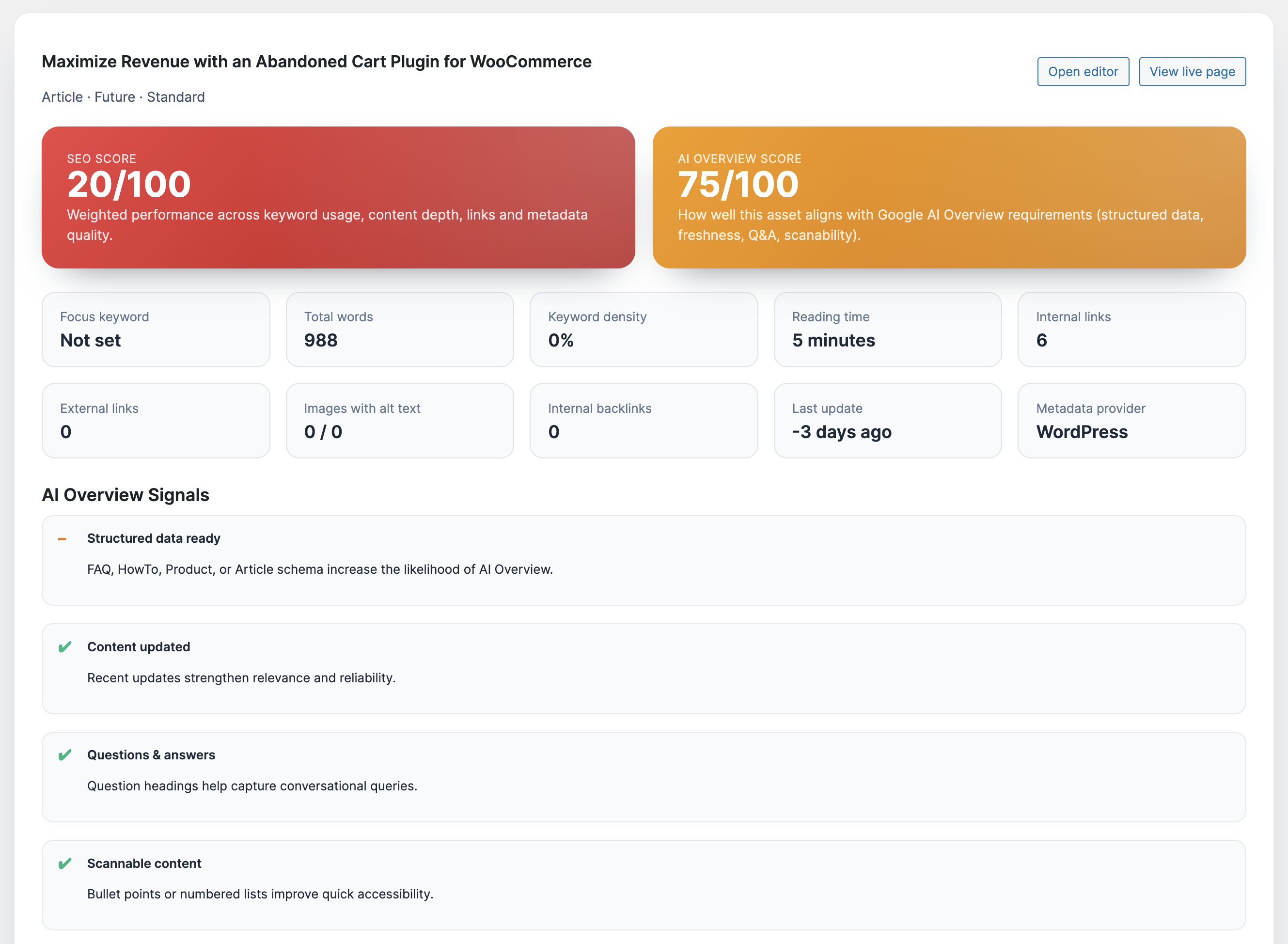
Day 1 – Install, Calibrate, Audit
Upload the plugin, activate it, and connect your AI provider in Settings → Xpert SEO AI. Import our ready-made playbook (available to all customers) to load AI prompts, schema templates, analyzer thresholds, and CTA defaults. Then run the analyzer on your top 15 URLs—these usually include cornerstone guides like our Google rankings blueprint. Export the report and sort by “High Impact.” Those are the fixes you’ll tackle over the next 72 hours.
Day 2 – Rebuild Outlines + Schema
Use the intent-based AI prompts to regenerate outlines. Select “Transactional” for product-led pages like WP Abandoned Cart Recovery or “Comparison” for content such as SEO showdowns. The assistant adds question-led H2s, data prompts, CTA placements, and recommended internal links automatically.
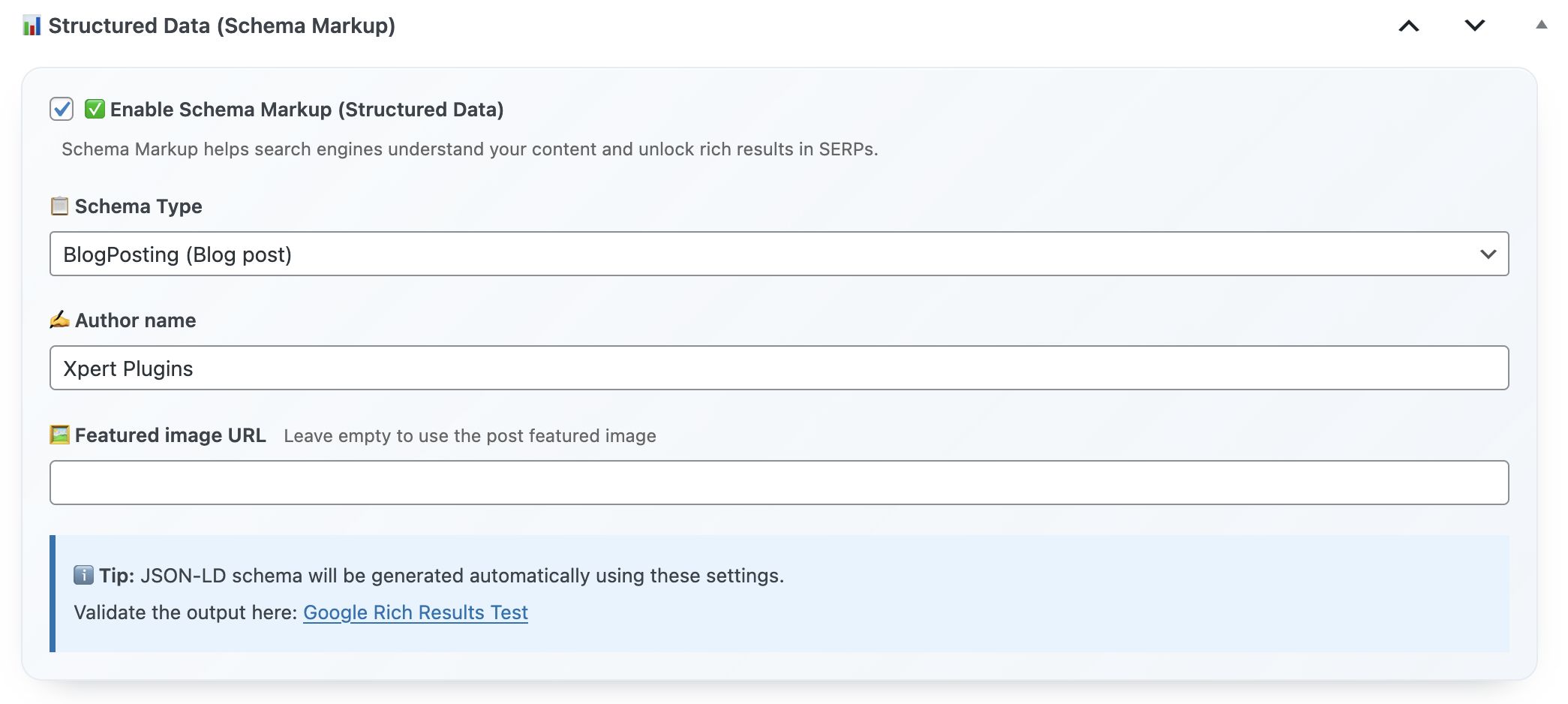
Next, open the Schema panel and enable Article + FAQ or Product + Review templates. Map WooCommerce data where relevant. This ensures Google’s crawlers see structured, up-to-date information the moment you republish.
Day 3 – Fix Technical Debt + Canonicals
The analyzer will flag duplicate H1s, missing alt text, crawl directives, or blocked canonicals. Resolve them directly inside the editor—no developer queue required. We’ve avoided countless crises on posts like memo reminder tutorials because the plugin refuses to publish until errors are gone.
Day 4 – Add Conversion Hooks + Internal Links
Use CTA components to showcase the €39/year offer, highlight testimonials, or add comparison tables. Link each article to high-performing categories such as AI Overview or WooCommerce case studies. Accept the plugin’s internal link suggestions so every updated URL redistributes authority to the rest of your cluster.
Day 5 – Publish, Promote, Monitor
Re-run the analyzer. Once it shows green, publish the updated posts in batches of three to five. Announce the refresh on social channels using the plugin’s polished Open Graph previews. Turn on daily alerts so you’ll know if AI Overview readiness dips or schema breaks. Within a few days you’ll see rankings move, because you’ve delivered exactly what Google and readers demand.
Bonus – 10 Micro-Optimizations that Pay Off Fast
- Insert a “Fresh Data” stat block referencing checkout wins.
- Add FAQ schema with three Q&As answered in conversational tone.
- Use the CTA component to highlight the plugin’s 14-day refund window.
- Embed internal links to Conversion Optimization articles.
- Enable Product schema for comparison tables are referencing paid tools.
- Compress hero images in WordPress but keep the premium look using provided assets.
- Activate automatic canonical enforcement to avoid duplicate-content penalties.
- Schedule analyzer rechecks every 30 days for newly refreshed URLs.
- Use the backlink widget to chase new mentions with updated quotes.
- Export the reporting dashboard and share the “before vs after” data in leadership updates.
Case Study: 7-Day Ranking Surge
Day 1: Analyzer audit showed missing FAQ schema, weak internal links, and outdated metas.
Day 2: AI prompts rewrote the outline; Article + FAQ schema were applied; canonical fixed.
Day 3: CTA widgets added; internal links pointed to Plugin Stack and the product page.
Day 4: Re-run analyzer, publish, submit to Search Console.
Day 7: Article climbed from position 17 to 6 and entered the AI Overview panel.
Frequently Asked Questions
Can I use it alongside Yoast or Rank Math? You can, but most users uninstall them—the plugin replaces metas, schema, and scoring tools entirely.
Does it handle multi-author workflows? Yes. Editors run analyzer tasks, writers follow prompts, and developers only step in for template-level changes.
What about Core Web Vitals? The plugin checks key performance flags and lets you disable heavy modules when necessary.
Ready for Your 7-Day Ranking Sprint?
Focus on the URLs that matter most, let Xpert SEO Manager guide every fix, and you’ll watch rankings climb faster than any manual spreadsheet process.
Want our team to walk you through the sprint? Email info@xpertplugins.com, mention “7-Day Ranking Sprint,” and we’ll share the task board we use internally.